The intersection of artificial intelligence and multimedia continues to evolve, breaking down barriers between different forms of media. In this project, the research titled “Text2Video-Zero: Text-to-Image Diffusion Models are Zero-Shot Video Generators” conducted by Picsart AI Research Lab represents a significant breakthrough. This study introduces a pioneering method that directly converts textual descriptions into videos, bridging the gap between natural language processing and computer vision. This development not only caters to the growing demand for dynamic visual content but also showcases the machine’s capability to interpret and transform human language into a visual format. By addressing the challenge of text-to-video synthesis, this research sets a new standard for interdisciplinary studies in artificial intelligence.
Introduction
The field of artificial intelligence continually seeks to break barriers between different forms of media. At the forefront of this endeavor stands the research titled “Text2Video-Zero: Text-to-Image Diffusion Models are Zero-Shot Video Generators” conducted by Picsart AI Research Lab [1]. This study introduces a method that converts textual descriptions directly into videos, marking a significant advancement in the integration of natural language processing and computer vision. Such a development not only addresses the growing demand for dynamic visual content but also showcases the potential of machines to interpret and render human language in a visual format. By offering a solution to the challenge of text-to-video synthesis, the research sets a new benchmark for interdisciplinary studies in artificial intelligence.
![Text-to-Video generation [1]](/posts/2023-11-22-zero-shot-video-generation/Zero-Shot%20Video%20Generation/figures/Figure%201%20-%20Text-to-Video%20generation.png)
Text-to-Video generation [1]
Project Motivation
In an era where visual storytelling is paramount, the ability to convert textual narratives into dynamic videos holds transformative potential. As platforms and audiences increasingly favor visual content, the research from Picsart AI Research Lab, titled “Text2Video-Zero: Text-to-Image Diffusion Models are Zero-Shot Video Generators,” emerges as a timely and innovative response to this demand [1]. The research by Picsart AI Research Lab is not just academically intriguing; it addresses a contemporary need, offering a solution that aligns with the evolving preferences of today’s digital consumers. Delving into its significance reveals:
Blending Words with Vision
The initiative by Picsart AI Research Lab offers a novel approach, merging the realms of text interpretation and visual representation. This is not just about generating images; it’s about crafting a coherent visual story based on textual cues.
A New Era of Content Creation
With the digital landscape being saturated with content, differentiation becomes key. A tool that can take textual descriptions and produce videos offers a unique edge, streamlining content creation and offering bespoke visual outputs.
Making Learning More Visual
In education, the value of a tool that can translate textual concepts into visual content is immeasurable. It offers a tangible way to represent abstract ideas, catering to a broader spectrum of learners.
Handling Big Data Challenges
The emphasis on utilizing large image datasets signifies the project’s ambition to operate at scale, ensuring that vast amounts of data can be processed without compromising on the quality of the generated videos.
Prioritizing User Experience
By integrating a user interface, the project underscores its commitment to accessibility. It’s a nod to the importance of ensuring that such groundbreaking technology is usable and beneficial to a wide audience.
Literature Review
The journey towards the synthesis of textual narratives into visual content has been paved by several groundbreaking works, each contributing a piece to the puzzle.
Table 1: Literature Review
| Year | Research Title | Authors | Contribution | Description |
|---|---|---|---|---|
| 2014 | Generative Adversarial Networks (GANs) [2] | Ian Goodfellow et al. | Introduction of GAN architecture |
|
| 2014 | Large-Scale Video Classification with CNNs [3] | Karpathy et al. | Insights into large-scale video generation |
|
| 2016 | Generating Videos with Scene Dynamics [4] | Vondrick et al. | Exploration of video generation from cues |
|
| 2021 | DALL·E [5] | OpenAI | Advancements in text-to-image synthesis |
|
| 2021 | Diffusion Models [6] | Prafulla Dhariwal and Alex Nichol | Emphasis on iterative refinement |
|
The following table visually represents the sequence of foundational works providing a clearer understanding of the research progression.
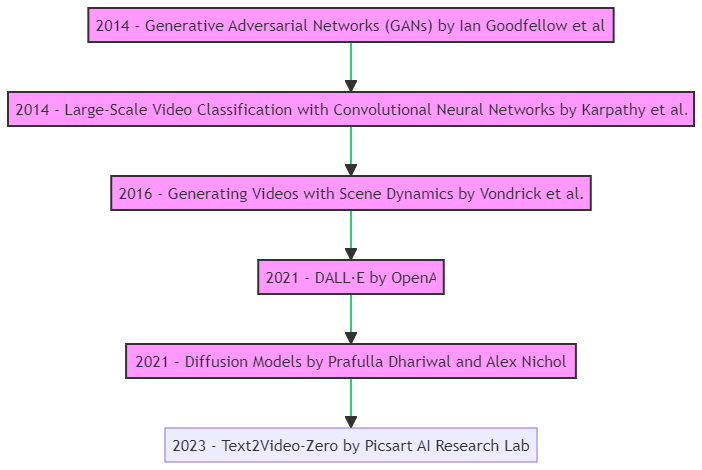
Research Progression
Project Implementation
The project focuses on implementing a web-based application for zero-shot video generation using text prompts. It integrates text-to-image diffusion models with a user-friendly interface, allowing users to generate videos based on textual descriptions. The implementation is structured across three main Python files: app.py, model.py, and app_text_to_video.py.
System Architecture

System Architecture
Table 2: System Architecture
| Component | Description |
|---|---|
| app.py |
|
| model.py |
|
| app_text_to_video.py |
|
Project Structure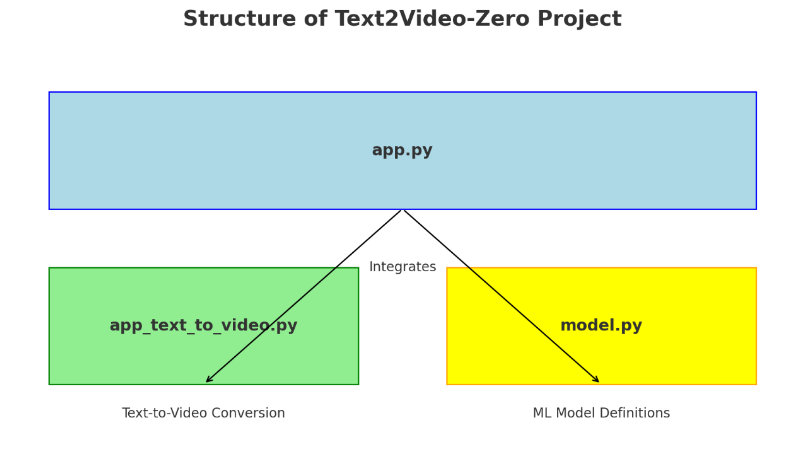
- app.py (Main Application): This is the central script that integrates various components of the application. It likely handles user interactions and coordinates the workflow.
- app_text_to_video.py (Text-to-Video Conversion): This script is specifically focused on converting text inputs into video outputs. It is integrated into the main application and utilizes the machine learning models defined in
model.py. - model.py (ML Model Definitions): This script contains the definitions of the machine learning models used in the project, particularly for the text-to-video conversion process.
The arrows indicate the integration of app_text_to_video.py and model.py into the main application (app.py). This setup allows for a modular and organized approach, separating the user interface, conversion logic, and model definitions.
Model Pipeline

Model Pipeline
The model pipeline diagram showcases the process from text input to video output:
Table 3: Model Pipeline
| Stage | Description |
|---|---|
| Text Prompt | Users provide text prompts as input. |
| Model Class | The Model class handles model selection and setup. |
| Model Pipeline | Different model pipelines, e.g., Text2Video, process the input. |
| Video Output | The final output is generated as a video. |
Project Flowchart
The flowchart illustrates the sequential steps involved in the project:
- Data Collection & Preprocessing: The initial stage involves sourcing and preparing the dataset.
- Feature Extraction: This step focuses on extracting relevant features from both textual and visual data.
- Model Implementation & Training: Here, the “Text2Video-Zero” model is adapted and trained.
- Evaluation: The model’s performance and the quality of generated videos are assessed.
- User Interface Development: The project concludes with the creation of a user-friendly interface.
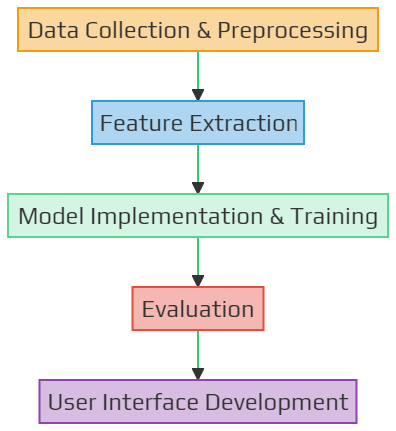
Flowchart
Project Progress
Overview
The data collection and feature extraction phases have been successfully completed within the allocated timeframe. The model implementation is also finalized, and the user interface design has been completed, marking a commendable achievement in our project’s progress.
Table 4: Project Timeline
| Task | Status | Completion Date |
|---|---|---|
| Data Collection | Completed | October 15, 2023 |
| Feature Extraction | Completed | October 23, 2023 |
| Model Implementation | Completed | October 31, 2023 |
| Evaluation | Completed | November 5, 2023 |
| User Interface Development | Completed | November 10, 2023 |
Task Status
Table 5: Task Status
| Task | Status | Deadline | Description |
|---|---|---|---|
| Data Collection | Completed | October 15, 2023 | Gathered diverse datasets from reputable sources, focusing on varied content categories. Implemented data preprocessing techniques for cleaning and standardization. |
| Feature Extraction | Completed | October 23, 2023 | Utilized advanced feature extraction methods, including deep learning techniques and natural language processing algorithms. Extracted rich features from textual and visual data, enabling comprehensive analysis and model training. Conducted exploratory data analysis to identify key features relevant to the project scope. |
| Model Implementation | Completed | October 31, 2023 | Developed machine learning models using Gradio and PyTorch frameworks. Experimented with various architectures, including convolutional neural networks (CNNs) and recurrent neural networks (RNNs), to optimize performance. Iteratively refined the models through training and validation phases. Implemented transfer learning techniques for leveraging pre-trained models. |
| Evaluation | Completed | November 5, 2023 | Defined comprehensive evaluation metrics, including accuracy, precision, recall, and F1-score. Evaluated model performance against benchmark datasets and real-world scenarios. Analyzed evaluation results to identify strengths and areas for improvement. |
| User Interface Development | Completed | November 10, 2023 | Designed user-friendly interfaces for seamless interaction. Created wireframes and mockups to visualize the user journey. Incorporated intuitive navigation and interactive elements. |
Challenges and Solutions
Table 6: Challenges and Solutions
| Challenge | Solution |
|---|---|
| Resource Intensity |
|
| Limited Knowledge and Resources |
|
| Collaboration and Communication |
|
Future Milestones and Goals
Table 7: Project Milestones
| Milestones | Description |
|---|---|
| Implement Advanced ML Models | Apply advanced algorithms for improved accuracy and performance. |
| Optimize Model Efficiency | Optimize models for resource efficiency and faster processing. |
| Enhance User Interface | Refine UI based on user feedback and conduct usability testing. |
| Integration and Testing | Integrate components, conduct tests, and address identified issues. |
| Documentation and Finalization | Prepare comprehensive documentation and review for completion. |
Methodology
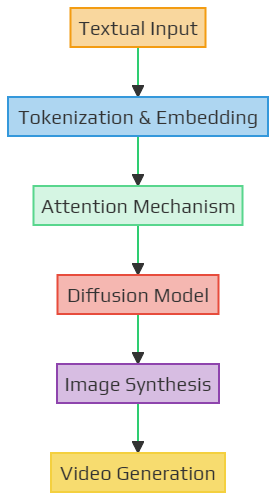
High-level architecture of the “Text2Video-Zero” model
Table 8: Components of high-level architecture of the "Text2Video-Zero" model
| Component | Description | Function |
|---|---|---|
| Textual Input | The starting point where a textual description or narrative is provided to the model. | Acts as the primary source of information that the model will use to generate visual content. |
| Tokenization & Embedding | The textual input is broken down into smaller chunks or tokens and then converted into numerical vectors. | Facilitates the model's understanding of the textual content by representing words or phrases in a format suitable for processing. |
| Attention Mechanism | A technique that allows the model to focus on specific parts of the textual input that are more relevant for the current task. | Enhances the model's capability to generate coherent visual content by emphasizing important textual cues. |
| Diffusion Model | The core of the "Text2Video-Zero" approach, responsible for the iterative refinement of the generated content. | Enables the model to produce high-quality images by refining the generated content over multiple iterations. |
| Image Synthesis | The model generates a static image based on the refined content from the diffusion model. | Acts as an intermediary step before video generation, ensuring that the initial frame or image aligns well with the textual description. |
| Video Generation | The model extends the synthesized image into a coherent video sequence, adding dynamic elements to the visual content. | Produces the final output, a video that visually represents the provided textual narrative. |
Dataset
Source
While there are several datasets available for image generation tasks, for this project, datasets like COCO (Common Objects in Context) or ImageNet could be considered due to their vastness and diversity. Additionally, datasets specifically designed for video tasks, like UCF101 or Kinetics, might be explored to understand temporal dynamics.
Key Features of the Dataset
- Diversity: The dataset will include images from various categories, ensuring that the model can handle a wide range of textual prompts.
- High-Resolution: To generate quality videos, the dataset will prioritize high-resolution images.
- Annotated Data: Each image in the dataset will be paired with textual descriptions, aiding in supervised training.
- Temporal Consistency: For video generation, the dataset will also include sequences of images that showcase movement or change over time.
ML Libraries
The successful implementation of the “Text2Video-Zero” model requires a combination of specialized tools and libraries, each tailored to handle specific tasks within the project.
Table 9: Library/Tool Used
| Tool/Library | Description |
|---|---|
| Torch [7] | PyTorch, a machine learning library, used for building and training neural network models. |
| Numpy [8] | A fundamental package for scientific computing with Python, used for numerical operations. |
| Gradio [9] | A library for building easy-to-use interfaces for machine learning models. |
| opencv-python [10] & opencv-contrib-python | OpenCV libraries for computer vision tasks and additional functionalities. |
| imageio and imageio-ffmpeg [11] | Libraries for reading and writing a wide range of image data, including video processing. |
| torchvision [7] | A package of popular datasets, model architectures, and image transformations for vision. |
| diffusers [12] | Library for working with latent diffusion models, often used in generative tasks. |
| einops | Provides more readable and flexible tensor operations, useful for data reshaping. |
| scipy [13] | Used for scientific and technical computing, includes modules for optimization and algebra. |
| tqdm [14] | A library for making terminal progress bars, useful for displaying progress in loops. |
| timm [15] | PyTorch Image Models, provides a collection of image models and pre-trained weights. |
| StableDiffusionInstructPix2PixPipeline | A specific pipeline from the diffusers library for Pix2Pix video generation tasks. |
| StableDiffusionControlNetPipeline | A pipeline from diffusers for tasks involving ControlNet with various detection capabilities. |
| UNet2DConditionModel | A model from the diffusers library, used in the Text-to-Video pipeline. |
| TextToVideoPipeline | A custom pipeline for converting text to video. |
| Pillow [16] | The Python Imaging Library (PIL) fork, adds image processing capabilities. |
| moviepy [17] | A video editing library, handy for video processing and editing tasks. |
| torchmetrics | A PyTorch-based library for high-level metric implementations, useful in ML metrics. |
| ControlNetModel, EulerAncestralDiscreteScheduler, DDIMScheduler | Specific components from diffusers library for advanced model control and scheduling. |
Timeline
Table 10: Project Timeline
| Date | Task |
|---|---|
| October 1, 2023 | Project Description/Proposal Submission |
| October 2 - October 6, 2023 | Conference with Instructor |
| October 7 - October 15, 2023 | Data Preprocessing |
| October 16 - October 23, 2023 | Model Development |
| October 24 - October 31, 2023 | Training Phase I & Progress Report |
| November 1 - November 10, 2023 | Training Phase II & UI Development |
| November 11 - November 15, 2023 | Testing & Debugging |
| November 16 - November 19, 2023 | Finalization, Documentation & Submissions |
| November 19, 2023 | PPT File Submission |
Gantt Chart
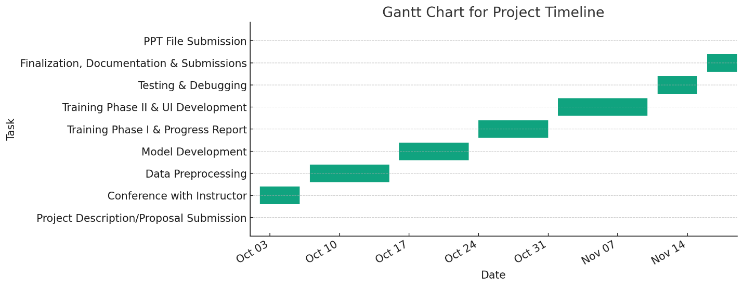
Gantt Chart
Launching Zero-Shot Video Generation ML Project
The local deployment of the Text2Video ML project provides a direct and interactive method for converting text into video content. The process prioritizes user engagement and efficiency, allowing for rapid access to and assessment of the generated videos.
Step 1: Starting the Project
Navigate to the project directory in the terminal. Run the Machine Learning project with the command python app.py. This action initiates the server and readies the Text2Video model for local deployment.
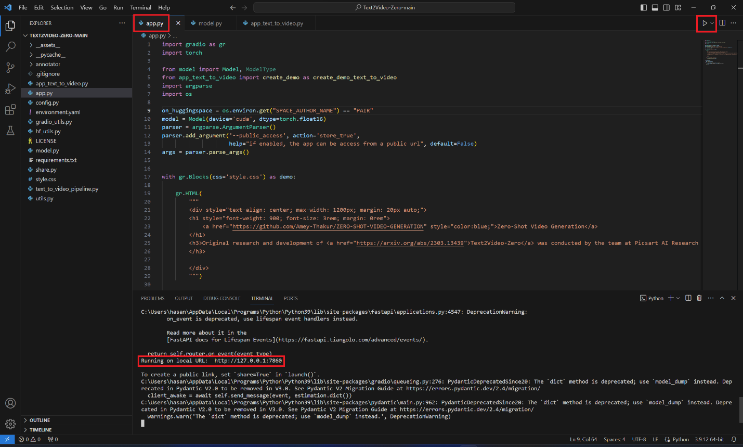
Starting the Project
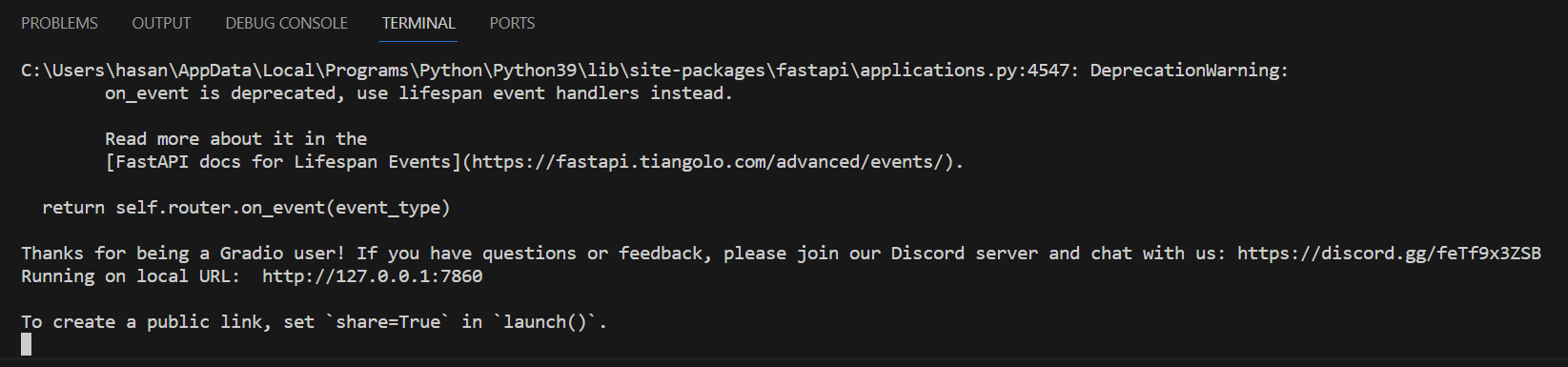
Terminal
Step 2: Accessing the Local Server
Following the command execution, a localhost link appears in the terminal. This URL serves as the gateway to the project’s user interface. Copy the provided localhost link, which generally appears as http://127.0.0.1:7860, and paste it into a web browser’s address bar.

Accessing the Local Server
Step 3: Interacting with the Text2Video Model Identify the Headings
On the local server page, the Text2Video model’s interface welcomes visitors. Enter text into the model’s interface to start the video generation process. The design ensures a seamless interaction with the ML model.
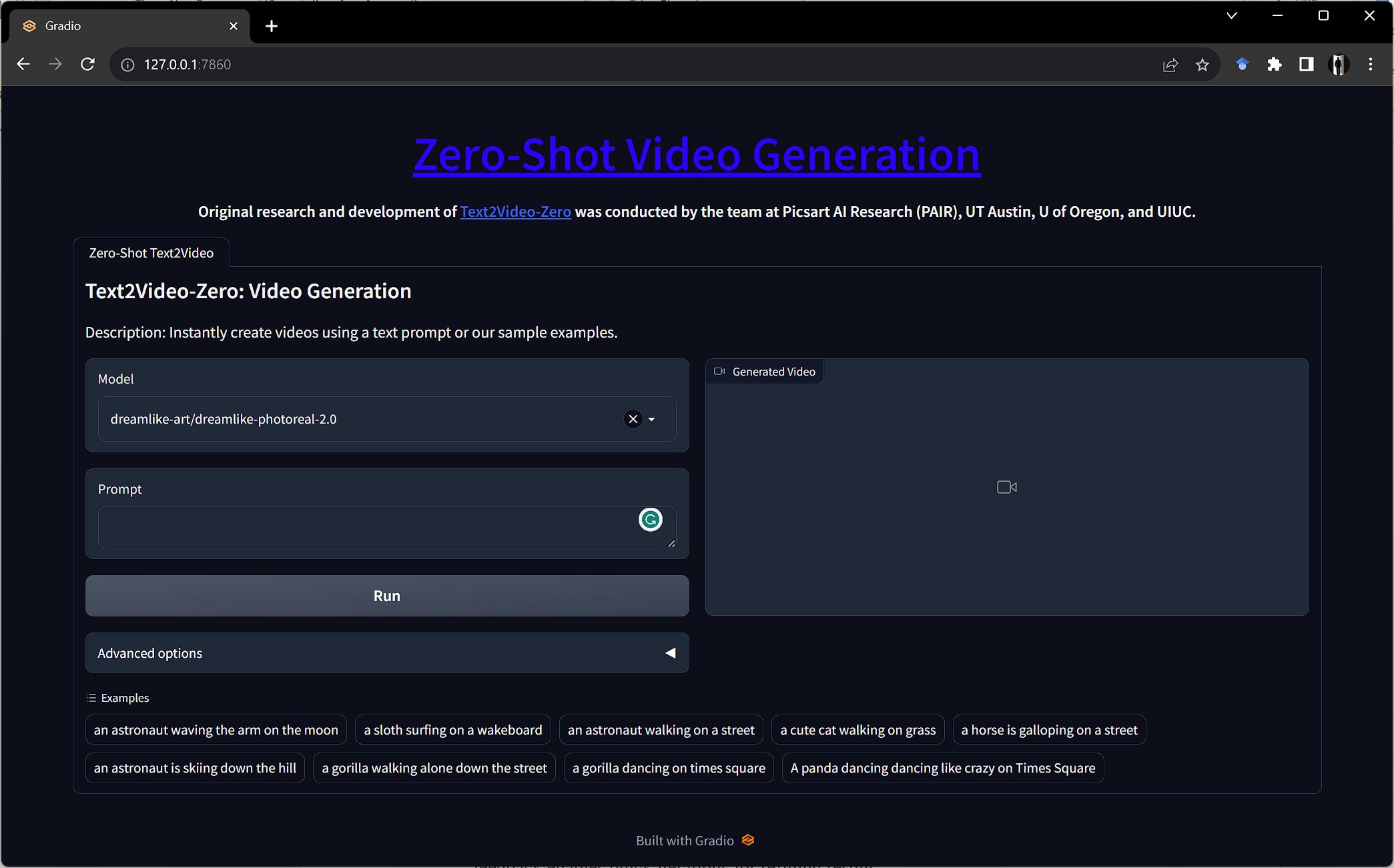
User Interface
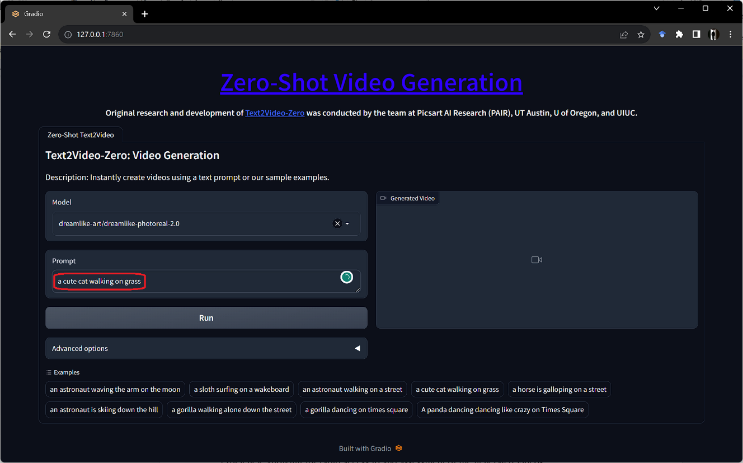
Interacting with the Text2Video Model
Step 4: Using the Model
Type the desired text into the model’s input field. This text acts as the input for the Text2Video model. Trigger the model to begin transforming the text into a video. The model processes the text and generates a corresponding video.
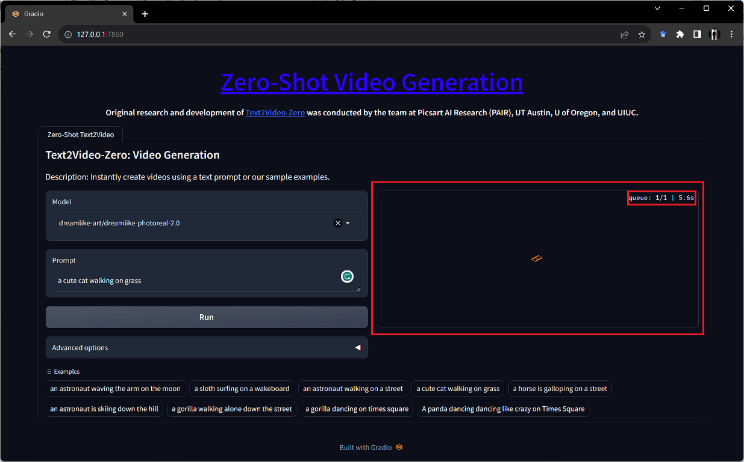
Using the Model
Step 5: Viewing the Results
Once the model processes the input text, the generated video displays on the webpage. Review and assess the output directly in the browser. This feedback enables quick iterations for refining results.
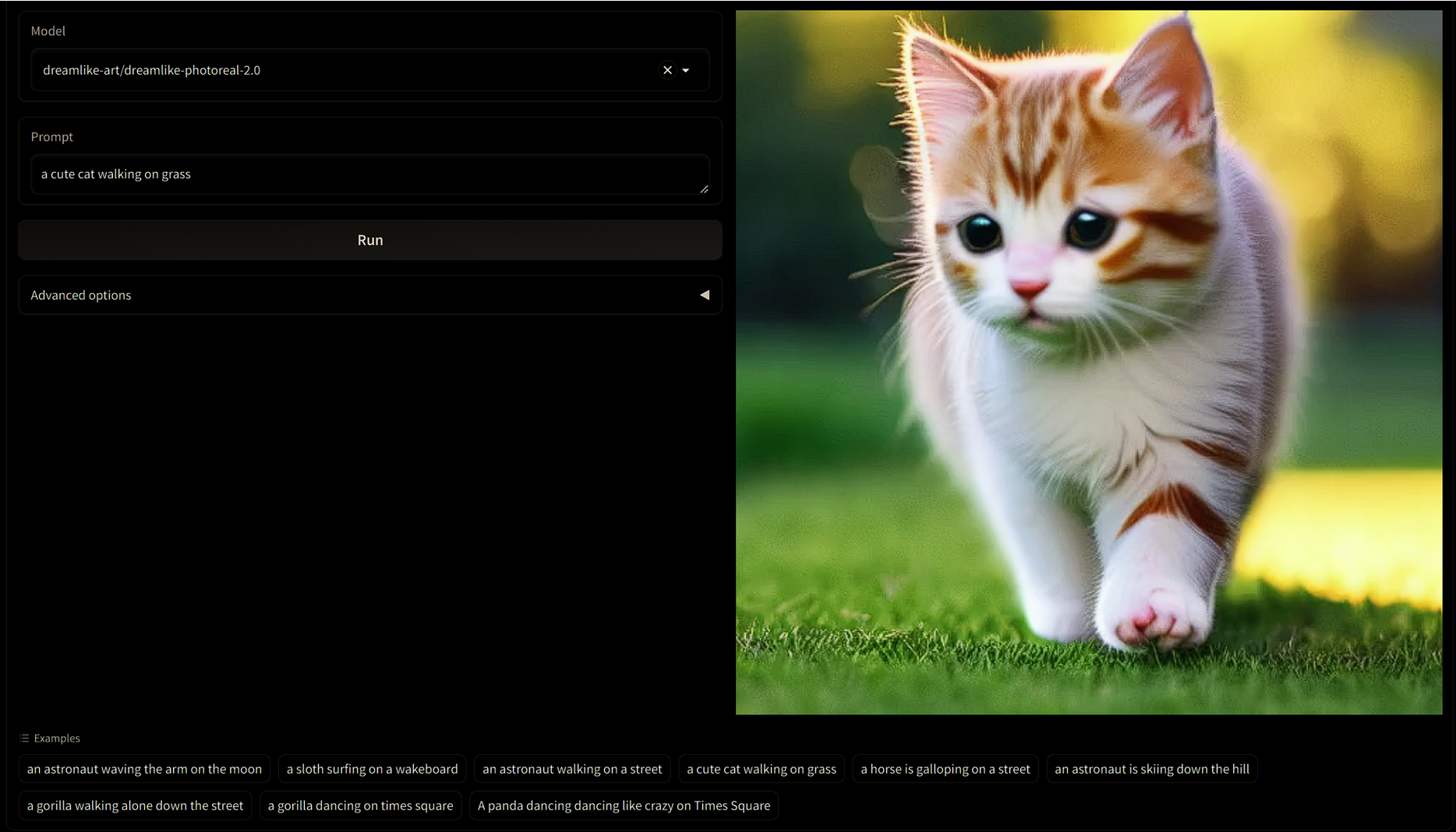
Viewing the Results
YouTube Demonstration
Scope & Limitations
Several factors have shaped the scope of this project despite its successful implementation. The quality and diversity of the extensive image dataset have significantly influenced the model’s performance, potentially resulting in suboptimal outcomes due to variations or biases in the data [1]. Available resources have also played a role, affecting the model’s resource demands and potentially extending training durations or limiting model complexity.
The model’s ability to generalize may vary depending on the complexity and ambiguity of the input text. While we designed the user interface for seamless interaction, it may encounter latency in real-time video generation due to the high computational requirements and resource demands, resulting in delays.
The project’s dependence on specific machine learning libraries means that unforeseen updates or changes in these libraries could present challenges or deviations in the intended functionality, necessitating ongoing monitoring and adaptation.
Conclusion
Implementing the “Text2Video-Zero: Text-to-Image Diffusion Models are Zero-Shot Video Generators” model marks a pivotal advancement in artificial intelligence, blending natural language processing with computer vision. This project transcends technical achievement, showcasing AI’s evolving ability to interpret human language visually.
Revolutionizing Content Creation
This technology’s capability to convert text into dynamic videos opens new horizons in various fields, from entertainment to education. It promises to change the way we create and interact with media, offering personalized and immersive experiences.
Overcoming Technical Challenges
The project tackled significant challenges in training AI models for accurate text interpretation and visualization. Employing diffusion models and attention mechanisms, the team demonstrated innovative solutions to these complex problems, contributing valuable insights to AI research.
Enhancing User Accessibility
Central to this project is making powerful technology accessible. Developing a user-friendly interface ensures that individuals with diverse technical backgrounds can utilize AI for video generation, democratizing access to advanced technology.
Setting New Benchmarks and Exploring Future Possibilities
The “Text2Video-Zero” project not only sets new standards in text-to-video synthesis but also opens doors to further research and applications. It prompts important discussions about AI’s role in content creation and the ethical considerations it entails.
The project represents a significant step towards a future where AI seamlessly integrates language and visuals, forging a new path in digital storytelling. Committed to pushing AI boundaries, enhancing user experience, and unlocking the full potential of text-to-video synthesis, this project paves the way for future innovations in the field.
Presentation
Additional Resources
Project Source & Machine Learning Materials
Access the complete source code, video demonstrations, and related machine learning materials via the repositories below:
Citation
Please cite this work as:
Thakur, Amey. "Zero-Shot Video Generation". AmeyArc (Nov 2023). https://amey-thakur.github.io/posts/2023-11-22-zero-shot-video-generation/.Or use the BibTex citation:
@article{thakur2023zeroshot,
  title   = "Zero-Shot Video Generation",
  author  = "Thakur, Amey",
  journal = "amey-thakur.github.io",
  year    = "2023",
  month   = "Nov",
  url     = "https://amey-thakur.github.io/posts/2023-11-22-zero-shot-video-generation/"
}