Special thanks to Mega Satish and Hasan Rizvi for their meaningful contributions, support, and wisdom that helped shape this work.
We propose to develop a program that can show a QuadTree view and data model architecture. Nowadays, many digital map applications have the need to present large quantities of precise point data on the map. Such data can be weather information or the population in towns. With the development of the Internet of Things (IoT), we expect such data will grow at a rapid pace. However, visualizing and searching in such a magnitude of data becomes a problem as it takes a huge amount of time. QuadTrees are data structures that are used to efficiently store point data in a two-dimensional environment. Each node in this tree has a maximum of four children. QuadTrees allow us to visualize the data easily and rapidly compared to other data structures. This project aims to build an application for interactively visualizing such data, using a combination of grid-based clustering and hierarchical clustering, along with QuadTree spatial indexing. This application illustrates the simulation of the working of the QuadTree data structure.
Introduction
The QuadTree is a spatial data structure with a hierarchical structure. It’s a tree with each level corresponding to a further refinement of the space in question. Though QuadTrees come in a variety of shapes and sizes, they can be used in a variety of ways. The concept can be applied to any dimension, and it is always a recursive subdivision of space that aids in the storage of information and provides the most vital or interesting details regarding space. In QuadTrees, we begin by adding pointers to its root node, which defines all potential space. The node divides into four child nodes when the number of points in the node reaches a predetermined maximum capacity. When any of those nodes has reached its full point capacity, it splits into four child nodes, and so on. QuadTrees have a range of applications; from internet services handling millions of requests every second, image compression, handling geolocation services, searching for nodes in 2-D areas, collision detection and more. Collision detection is a crucial feature in the majority of video games. Detecting when two entities collide is critical in both 2D and 3D games, since bad collision detection may lead to some very intriguing effects. Numerous games need the use of collision detection techniques to identify whether two objects have interacted, however, these algorithms are frequently costly procedures that may significantly slow down a system. In this paper, we will be addressing QuadTrees, and how we can use them to speed up collision detection by skipping pairs of objects that are too far apart to collide. We’ll be writing a general-purpose, scalable and re-usable QuadTree library in Typescript and importing it into a visualization tool to depict its internal workings.
This project aims to provide a web application for visualizing the QuadTree structure. QuadTree. The users should be able to understand the working of the QuadTree and experience the simulation provided on the web application. This Visualizer provides an interactive environment where users can change configurations of the QuadTree and environment conditions at runtime.
Literature Survey
Brief History of QuadTree
A QuadTree [1][2][3] is a tree data structure with zero or four offspring at each node. Its key distinguishing feature is its method of recursively partitioning a flat 2-D [2] space into four regions. The data associated with a leaf cell differs depending on the application, but the leaf cell is a “unit of relevant spatial information.” The subdivided areas or regions can be square or rectangular or any other form. This data structure was named a QuadTree by Raphael Finkel and J.L. Bentley in 1974.
Existing Systems
Table 1: Existing Systems
| Author’s Name | Title and Year of Publication | Findings |
|---|---|---|
| Qing Cai, Yimin Zhou | A quadtree-based hierarchical clustering a method for visualizing large point dataset, 2016 | This paper introduces a new clustering method with quadtree spatial indexing. It explains a grid-based, partitioning, hierarchical clustering method on quadtree file system storage. |
| Clifford A. Shaffer, Hanan Samet | Optimal quadtree construction algorithms, 1987 | In this paper, an algorithm for constructing a quadtree in time proportionate to the number of blocks in a given picture is described. |
| Irene Gargantini | An effective way to represent quadtrees, 1982 | This paper proposes a new structure very similar to a quadtree, called a “linear quadtree” and different algorithms used to represent that structure. The linear quadtree saves 66% of the computer storage required by regular quadtrees. |
Proposed Methodology
Brief History of QuadTree
The QuadTree is a data structure for organizing objects based on their locations in a two-dimensional space. By definition, a QuadTree [2] is a tree in which each node has at most four children. QuadTree implementations ensure that as points are added to the tree, nodes are rearranged such that none of them has more than four children. Figure 1 below illustrates the general concept of QuadTree data structure.
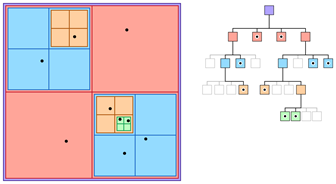
QuadTree Data Structure
The QuadTree partitioning strategy divides space [1][2] into four quadrants at each level. When a quadrant contains more than one object, the tree subdivides that region into four smaller quadrants, adding a level to the tree. A similar partitioning is also known as a Q-tree. QuadTrees are a way of partitioning space so that it’s easy to traverse and search.
Applications of QuadTree
It is used extensively in computer graphics, image compression and is also used to represent spatial relations. Visualizing data points with a QuadTree [3] and checking and detecting collisions. The computer issue of identifying the collision of two or more bodies is known as collision detection. Collision detection [5] is a basic problem in computational geometry that has applications in a wide range of computer domains. Figure 2 shows the use case of Quadtree Visualizer.
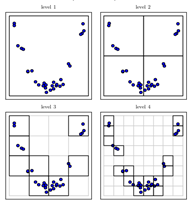
QuadTree Visualizer
QuadTrees are also implemented for spatial indexing [3] while searching a particular point or location in a map. QuadTrees are very efficient as they can sparse through the maps very easily and quickly compared to other methods. Figure 3 shows the use case of QuadTree Spatial Indexing.
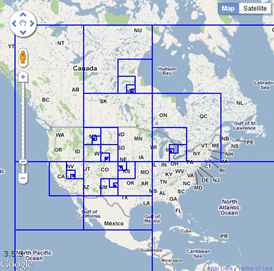
QuadTree Spatial Indexing
QuadTrees, for example, can handle a sparse Mario level a billion tiles across, where one of the tiles contains the finishing spot. A QuadTree will split the arrival spot into different cells and still use gigantic cells for the empty spaces. Figure 4 shows the use case of QuadTree in Gaming.
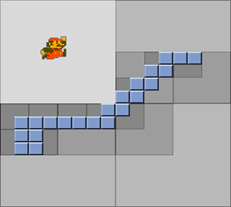
QuadTree in Gaming
Some possible use cases of QuadTree
Hit detection:
For example, as seen in the maps above, there are a lot of points in space. If we wish to discover an arbitrary point P, we can do it inside that set of points. This quickly turns into a frantic process. We could check each and every single point to P, but when there are 1000 points yet none of them are P, we will have to do 1000 comparisons to figure out which point is P.
Alternatively, we may get a very rapid lookup by retaining a matrix (a 2D array) of Booleans for each and every conceivable point in this space. However, suppose the area occupied by these points is 1 million × 1 million so we need to keep 1,000,000,000,000 variables.
A QuadTree would seem to be a better choice in this scenario. To find P, the QuadTree [1] will determine which quadrant it is in. Then it will determine which quadrant within that quadrant it is in. Even if there are 1000 points in the space, it will only have to execute this seven times for a 100 × 100 space (provided points can have numerical value only). Once it’s found that rectangle node, it just needs to test whether any of the four-leaf equals P.
Sparse Data using QuadTree:
QuadTrees are ideal for sparse data to search for a particular point. By only performing computations between items in comparable nodes/quads, QuadTrees aid in obtaining knowledge about which collisions in an environment are worth investigating.
QuadTree nodes split into four evenly-sized leaf nodes when the number of objects inside them reaches a certain capacity. Objects are inserted into a fresh QuadTree every iteration, which places each object in its deepest possible node.The QuadTree algorithm improves upon the naive T(n) = θ(n2) algorithm and achieves T(n) = O(n2), T(n) = Ω(n log n). Inadvertently, QuadTrees depending on pixels are a sort of trie.
Limitations of QuadTree
The fundamental drawback of QuadTrees is that comparing two pictures [4] that vary only in rotations or translation is nearly difficult. This is due to the fact that the QuadTree depiction of such pictures will be so distinct. The picture rotation methods offered are limited to revolutions of 90 degrees. There is no alternative rotation available, thus there is no translation facility. Figure 5.1 shows the original image and Figure 5.2 shows the rotated images. As we can see, it is not possible to compare two images that are different in terms of rotation.
 First Image.png)
(5.1) First Image
 Rotated Image.png)
(5.2) Rotated Image
Image Translation in QuadTree
Types of QuadTree
There are three types of QuadTrees:
- Point QuadTree
- Edge QuadTree
- Polygonal Map QuadTree.
Some characteristics are shared by all QuadTrees:
- They break space down into flexible cells.
- There is a maximum capacity for each cell (or bucket). When the bucket reaches its full capacity, it separates.
- The QuadTree’s spatial decomposition is followed by the tree directory.
Working of QuadTree
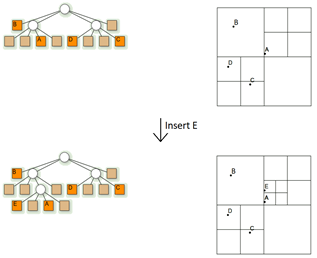
The Figure 6 below depicts how a QuadTree [7] alters as a result of insertion of a point E:
- Make four boxes out of the current two-dimensional space.
- If a box includes one or more points, make a child object that stores the box’s two-dimensional space.
- Do not generate a child for a box that does not contain any points.
- Repeat with each of the children.
Working of QuadTree
Algorithm
Three types of nodes are used in quadtree:
- Point node: It is used to represent a point. It is always a leaf node.
- Empty node: It is used as a leaf node to represent that no point exists in the region it represents.
- Region node: This is always an internal node. It is used to represent a region. A region node always has 4 children nodes that can either be a point node or an empty node.
Insertion in QuadTree
Insertion: A recursive function for storing a point in a QuadTree.
- As the current node, begin with the root node.
- If the specified point is not within the boundary indicated by the current node, the insertion should be terminated with an error.
- Determine the best child node to store the point.
- If the child node is empty, it should be replaced with a point node that represents the point. Insertion should be stopped.
- Replace the child node with a region code if it is a point node. For the point that was just replaced, use insert. Set the current node to be the region’s freshly generated node.
- Set the specified child node as the current node if it is a region node. Proceed to step 2.
Search in QuadTree
Search: This is a boolean function that determines whether or not a point exists in 2D space.
- As the current node, begin with the root node.
- If the specified point is not within the boundary indicated by the current node, the search should be terminated with an error.
- Determine the best child node to hold the point in.
- Return FALSE if the child node is empty.
- Return TRUE if the child node is a point node and matches the specified point, else return FALSE.
- Set the current node as the child region node if the child node is a region node. Proceed to step 2.
Complexity
Time complexity:
Table 2: Time Complexity
| Operation | Complexity |
|---|---|
| Find | O(log2N) |
| Insert | O(log2N) |
| Search | O(log2N) |
Space complexity:
O(k log2N), where k is the count of points in the space and Space is of dimension N × M, N ≥ M.
Collision in QuadTree
Because the data points in the visualizer are always shifting, collisions are unavoidable. Collision [5] is the meeting of two bodies, in this case data points in the shape of circles. The QuadTree visualization is built on top of a 2D Collision System with a restitution coefficient that can be adjusted to differentiate between elastic and inelastic impacts. Collision detection is a costly activity. One method for speeding up collision detection is to use QuadTrees.
Coefficient of Restitution
The coefficient of restitution [6] is the ratio of the final velocity to the starting velocity of two objects after they collide. The restitution coefficient, written as ‘e,’ is a unitless quantity with values ranging from 0 to 1.
The coefficient of restitution is a quantity that represents the nature of the colliding materials. The coefficient of restitution informs about the elasticity of the collision. A fully elastic collision is one in which there is no loss of total kinetic energy. The greatest coefficient of restitution for this sort of collision is e = 1. A fully inelastic collision is one in which all of the kinetic energy is wasted. They have a restitution coefficient of e = 0. The majority of real-life crashes occur in the middle. The Coefficient of Restitution mathematical formula is as follows:
You can see from the following equation that you always divide the smaller number by a larger number. As a result, the restitution coefficient is always positive.
Workflow of QuadTree
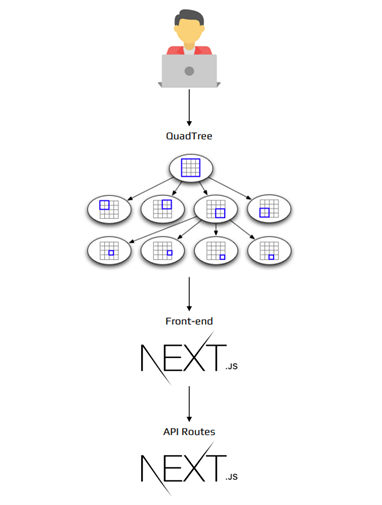
Figure 7 illustrates the workflow of the QuadTree application. Next.js is responsible for both client and server-side scripting.
Workflow of QuadTree
Model Architecture
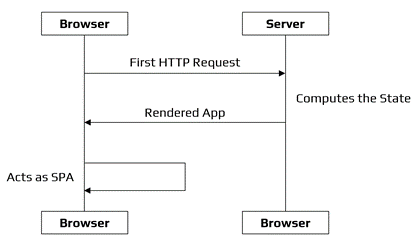
An architectural model is a simplified representation of a system. It is an estimate that captures the various system characteristics. It is a generalized form that has all of the system’s critical elements. The process of modelling architecture entails determining the system’s features and expressing them as models so that the system may be understood. Architecture models make it possible to see information about the system represented by the model. Figure 8 depicts the web application’s model architecture.
Model Architecture of QuadTree
Design
Experimental Setup
- Since we are using Next.js in our project, we first need to have Node.js.
- The web application works on http://localhost:3000.
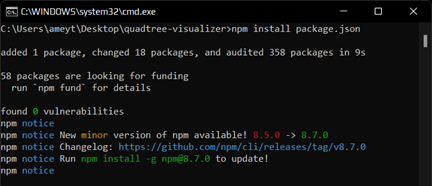
- To run the application locally, we need to install the packages required using the npm command:
npm install package.json. - Figure 9 shows the command prompt with the packages installed using the npm install commands.
Command: npm install package.json
- After installing all the dependencies, we then run the command:
npm run dev. - After we run the command:
npm run dev. It will run the developer server. - Figure 10 depicts the compilation and running of the server. The server is working on http://localhost:3000.
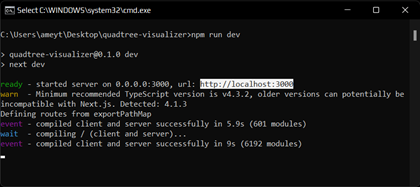
Compilation & Server Hosting
Implementation
Quadtree.ts
Show Code
// A QuadNode object must have a way to tell if it is inside a given node's bounds

export interface QuadObject {
  insideRect: (rect: Rect) => boolean // whether the object in fully contained within a Rect
}

// Node of a QuadTree
// carries data about its:
// - bounds
// - depth
// - children
// - containing objects

export class QuadNode {
  public leaves!: Array<QuadNode> | null
  public quadObjects = new Array<QuadObject>()

  constructor(
    public bounds: Rect,
    private depth: number
  ) { }

  // cleanup references down the QuadTree recursively

  clear(): void {
    this.quadObjects = new Array<QuadObject>()
    this.leaves?.forEach((leaf: QuadNode) => leaf.clear())
    this.leaves = null
  }

  // process any updates recursively down the tree

  process(quadNodeProcedure: (quadNode: QuadNode) => void): void {
    quadNodeProcedure(this)
    this.leaves?.forEach((leaf: QuadNode) => leaf.process(quadNodeProcedure))
  }

  // Initialise the sub-quads of the current Node,
  // and test if any object fit into a deeper quad

  subdivide(): void {
    // calculate new bounds of sub-quads
    const midW = this.bounds.w / 2
    const midH = this.bounds.h / 2
    const newDepth = this.depth + 1

    this.leaves = [
      new QuadNode(new Rect(this.bounds.x, this.bounds.y, midW, midH), newDepth),
      new QuadNode(new Rect(this.bounds.x + midW, this.bounds.y, midW, midH), newDepth),
      new QuadNode(new Rect(this.bounds.x, this.bounds.y + midH, midW, midH), newDepth),
      new QuadNode(new Rect(this.bounds.x + midW, this.bounds.y + midH, midW, midH), newDepth)
    ]

    // place current particles into newly created groups
    // removes the object from the current array if it fits into another node

    this.quadObjects.forEach((object: QuadObject) => {
      this.leaves?.forEach((leaf: QuadNode) => {
        if (leaf.insert(object))
          this.quadObjects.splice(this.quadObjects.indexOf(object), 1) // remove from the current level
      })
    })
  }

  // Inserts an object into the deepest point of the QuadTree it belongs
  // returns whether the object fit into the bounds of the currently attempted quadNode

  insert(quadObject: QuadObject): boolean {
    // test if the quad bounds contains the object
    if (!quadObject.insideRect(this.bounds)) return false

    // directly insert if max depth is reached
    if (this.depth >= QuadTree.maxDepth)
      return !!this.quadObjects.push(quadObject) // length should always be non-zero for push -> truthy

    // Node is safe to push object into
    // first try the leaves
    if (this.leaves)
      for (const leaf of this.leaves)
        if (leaf.insert(quadObject)) return true

    // if no leaves, or leaves fail to cover object, push current node
    this.quadObjects.push(quadObject)

    // test if max capacity for the node has been reached
    if (!this.leaves && this.quadObjects.length > QuadTree.capacity)
      this.subdivide() // divide and redistribute

    // object has been placed into an array by this point
    return true
  }
}

// Root Reference for a QuadTree
// primary interface for operations

export class QuadTree {
  static maxDepth = Math.ceil(Math.log2(1000 / 5) / 2) + 1 // default for as small as 5 pixels on a 1000x1000 grid
  static capacity = 5
  public quadRoot: QuadNode

  constructor(
    public bounds: Rect,
    public quadObjects: Array<QuadObject>
  ) {
    this.quadRoot = new QuadNode(bounds, 0)
  }

  // Updates the QuadTree will most recent object positions and then recursively calls a procedure
  // @param quadNodeProcedure function to call on each node of the tree

  process(quadNodeProcedure: (quadNode: QuadNode) => void): void {
    this.quadRoot.clear() // refresh the QuadNodes
    this.quadObjects.forEach((quadObject: QuadObject) => this.quadRoot.insert(quadObject)) // insert updated objects
    this.quadRoot.process(quadNodeProcedure) // call any user-defined, per-node procedure
  }

  // Inserts a QuadObject into the deepest level of the QuadTree it belong
  // @param quadObject object to insert into the QuadTree

  insert(quadObject: QuadObject): void {
    this.quadObjects.push(quadObject) // update master object array
    this.quadRoot.insert(quadObject) // descend object into tree
  }
}
Package.json (Dependencies used)
Show Code
"dependencies": {
  "@material-ui/core": "^4.11.2",
  "@material-ui/icons": "^4.11.2",
  "next": "10.0.5",
  "react": "17.0.1",
  "react-dom": "17.0.1"
},

"devDependencies": {
  "@types/node": "^14.14.20",
  "@types/react": "^17.0.0",
  "@typescript-eslint/eslint-plugin": "^4.12.0",
  "@typescript-eslint/parser": "^4.12.0",
  "eslint": "^7.17.0",
  "eslint-plugin-react": "^7.22.0",
  "gh-pages": "^3.1.0",
  "sass": "^1.32.2",
  "typescript": "^4.1.3"
}
Python Implementation
QuadTree from Images
The Python implementation demonstrates how to generate a QuadTree from an image and visualize the results. This implementation shows the core algorithm for splitting images into quadrants and calculating mean colors for each section.
The main objective is to generate a quadtree from an image and display it.
Input:
import matplotlib.pyplot as plt
import matplotlib.image as mpimg
import numpy as np

img = mpimg.imread('./dataset/Filly.jpg')
img.shape
Output:
(1280, 960, 3)
Input:
plt.imshow(img)
Output:
<matplotlib.image.AxesImage at 0x1d800729ed0>
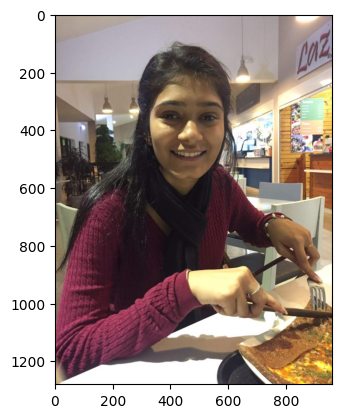
Original Image
Split Image in 4
A big part of how the algorithm works is splitting the image into 4 quarters and calculate the mean color of each part to create a level of the tree. Let’s split the image into four parts and calculate the mean color of each quadrant.
Input:
from operator import add
from functools import reduce

def split4(image):
    half_split = np.array_split(image, 2)
    res = map(lambda x: np.array_split(x, 2, axis=1), half_split)
    return reduce(add, res)

split_img = split4(img)
split_img[0].shape
Output:
(640, 480, 3)
Input:
fig, axs = plt.subplots(2, 2)
axs[0, 0].imshow(split_img[0])
axs[0, 1].imshow(split_img[1])
axs[1, 0].imshow(split_img[2])
axs[1, 1].imshow(split_img[3])
Output:
<matplotlib.image.AxesImage at 0x1d8467e38d0>
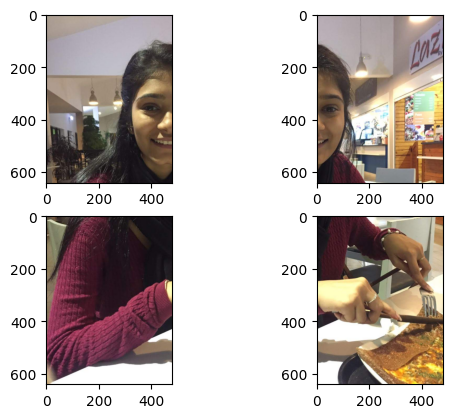
Split Quadrants
Reconstruct The Full Image from The Split
This will be useful when we want to display the image back, as the quadtree will store the images split into 4
Input:
def concatenate4(north_west, north_east, south_west, south_east):
    top = np.concatenate((north_west, north_east), axis=1)
    bottom = np.concatenate((south_west, south_east), axis=1)
    return np.concatenate((top, bottom), axis=0)

full_img = concatenate4(split_img[0], split_img[1], split_img[2], split_img[3])
plt.imshow(full_img)
plt.show()
Output:
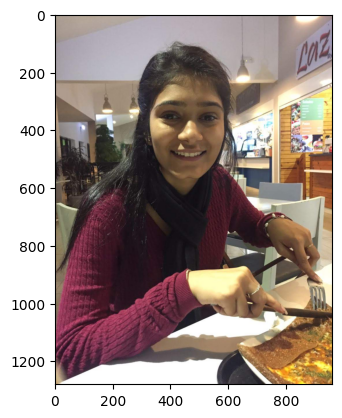
Reconstructed Image
Calculate the mean
Calculate the mean of all the parts of the split.
Input:
def calculate_mean(img):
    return np.mean(img, axis=(0, 1))

means = np.array(list(map(lambda x: calculate_mean(x), split_img))).astype(int).reshape(2,2,3)
print(means)
plt.imshow(means)
plt.show()
Output:
[[[123 112 107]
  [159 141 128]]

 [[101  67  76]
  [149 126 101]]]
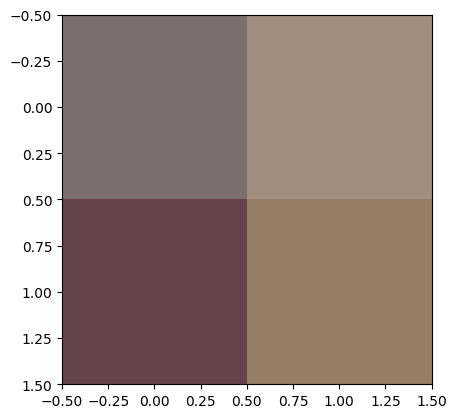
Mean Calculation
QuadTree Data Structure
Now let’s create a data structure that will allow us to construct our quadtree. It’s a recursive calculation.
Input:
def checkEqual(myList):
    first=myList[0]
    return all((x==first).all() for x in myList)

class QuadTree:

    def insert(self, img, level = 0):
        self.level = level
        self.mean = calculate_mean(img).astype(int)
        self.resolution = (img.shape[0], img.shape[1])
        self.final = True

        if not checkEqual(img):
            split_img = split4(img)

            self.final = False
            self.north_west = QuadTree().insert(split_img[0], level + 1)
            self.north_east = QuadTree().insert(split_img[1], level + 1)
            self.south_west = QuadTree().insert(split_img[2], level + 1)
            self.south_east = QuadTree().insert(split_img[3], level + 1)

        return self

    def get_image(self, level):
        if(self.final or self.level == level):
            return np.tile(self.mean, (self.resolution[0], self.resolution[1], 1))

        return concatenate4(
            self.north_west.get_image(level),
            self.north_east.get_image(level),
            self.south_west.get_image(level),
            self.south_east.get_image(level))
img = mpimg.imread('./dataset/Filly.jpg')

quadtree = QuadTree().insert(img)
plt.imshow(quadtree.get_image(1))
plt.show()
plt.imshow(quadtree.get_image(3))
plt.show()
plt.imshow(quadtree.get_image(7))
plt.show()
plt.imshow(quadtree.get_image(10))
plt.show()
Output:
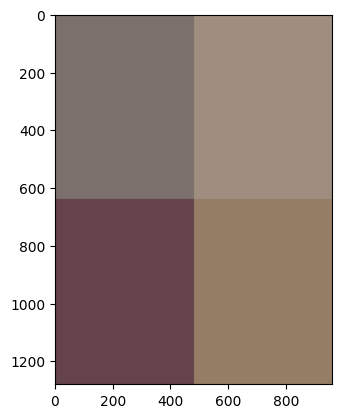
QuadTree Data Structure
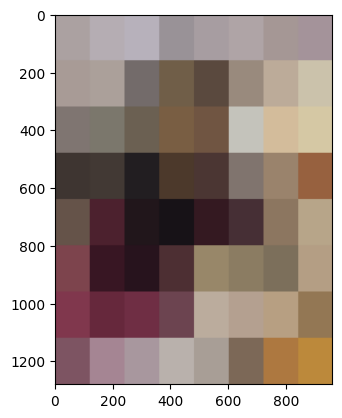
QuadTree Depth 3
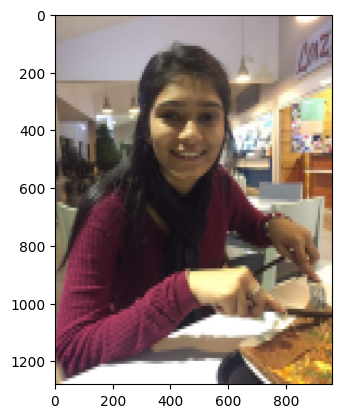
QuadTree Depth 7
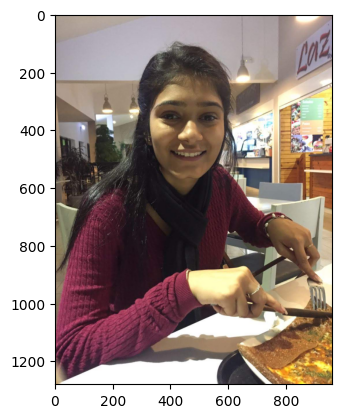
QuadTree Depth 10
Results
Homepage
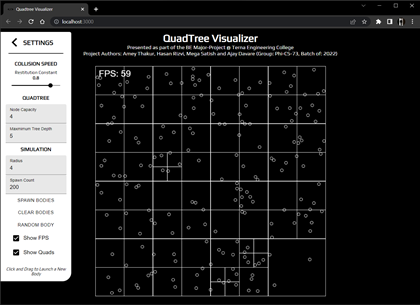
Figure 19 illustrates the homepage of the web application. Here we can visualize a QuadTree with the data points and the different divisions of the QuadTree.
Homepage
Clear QuadTree
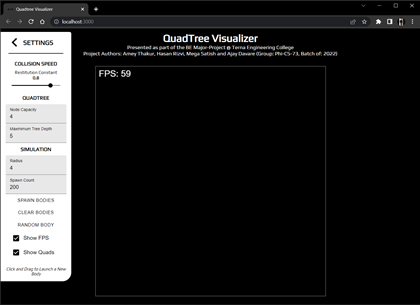
Figure 20 shows a clean QuadTree without the data points. Since there are no points, we can see only the square.
Clear QuadTree
Spawn Bodies
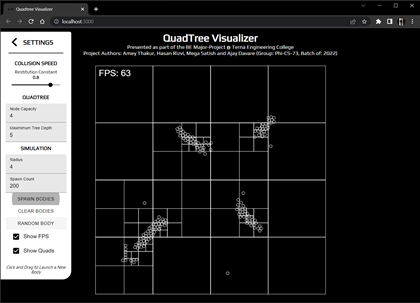
Figure 21 depicts the spawn circles in the QuadTree. Here we can see the clear division of the QuadTree.
Spawn Bodies
Random Bodies
Figure 22.1 & Figure 22.2 show the random bodies generated randomly in the QuadTree.

(22.1) Random Bodies

(22.2) Random Bodies
Random Bodies
Random & Spawn Bodies
Figure 23.1 & 23.2 Figure shows the combination of both random and spawn bodies in the QuadTree.

(23.1) Random & Spawn Bodies

(23.2) Random & Spawn Bodies
Random & Spawn Bodies
Control Panel
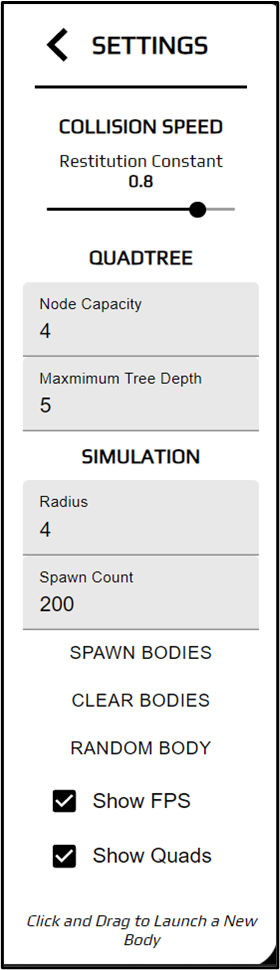
Figure 24 illustrates the control panel. The control panel here is used to simulate different environments in the QuadTree such as types of bodies, the coefficient of restitution and the frames per second of the movement of the bodies.
Control Panel
YouTube Demonstration
Future Scope
Since QuadTrees are a type of tree data structure in which each internal node has exactly four children, they are most often used to partition a two-dimensional space by recursively subdividing it into four quadrants or areas. The areas can be rectangular, square, or any other form. The QuadTree is used as a utility as part of the Maps SDK for iOS Utility Library. They’ve also been heavily used in image compression algorithms and higher-level design of 8-bit games like Mario.
Eventually, we believe that QuadTrees can be used for memory management in a big and hierarchical database. It is one of the most crucial places we can use the QuadTree and it can be used to access varied data points and make searching efficient and fast.
Further work in this project can be to let the user visualize their own QuadTree using their own dataset. Users will have to give a dataset for the input and the visualizer will create a QuadTree based on the given dataset. Additional features could be added here such as the different color and shapes for different data points. Moreover, this project can be implemented as part of bigger projects such as Geolocation, Collision Detection Systems.
Conclusion
We explored a type of tree data structure named QuadTree, that can be used to represent 2-D spaces. In this process, we learnt how/why they are used in a range of applications from scaling up internet services to handle millions of requests per minute to their ever-present use in geolocation-based services like Maps and how we can build applications/libraries to implement the same in our apps/services. It can be concluded QuadTrees are extremely powerful data structures that are still heavily under-utilized in both the industry and community applications. By the time of completion of this project we’ve learned to develop scalable and reusable codebases for large projects, understood the fundamentals of API build and interaction and understood function in a time-bound manner and collaborate at scale across various tasks and disciplines.
Presentation
Additional Resources
Project Source, Research & Visualizations
Access the complete source code, full research paper, video demonstrations, and related engineering materials via the repositories below:
Citation
Please cite this work as:
Thakur, Amey. "QuadTree Visualizer: Spatial Indexing for Collision Detection". AmeyArc (Apr 2022). https://amey-thakur.github.io/posts/2022-04-27-quadtree-visualizer/.Or use the BibTex citation:
@article{thakur2022quadtree,
  title   = "QuadTree Visualizer: Spatial Indexing for Collision Detection",
  author  = "Thakur, Amey",
  journal = "amey-thakur.github.io",
  year    = "2022",
  month   = "Apr",
  url     = "https://amey-thakur.github.io/posts/2022-04-27-quadtree-visualizer/"
}