Special thanks to Mega Satish for her meaningful contributions, support, and wisdom that helped shape this work.
We developed an online chess game in Node.js for both single-player and multiplayer modes and deployed it on Heroku. The game follows Human-Machine Interaction principles and offers a clean, attractive, and user-friendly interface. Players can customize the theme and background of the chessboard to their liking. In multiplayer mode, users can play against others with a built-in chatbox for real-time conversation. Selected squares are highlighted for clarity, and a sound confirms each move. The game also helps users understand the possible movements of each piece. In multiplayer, the browser notifies players if an opponent leaves mid-game.
Introduction
Brief Description of the Project
The project “Online Chess Game” implements the classic game of Chess with a graphical user interface (GUI). The game strictly follows the standard rules of chess, and each piece moves according to its valid moves. It is played on an 8×8 checkerboard, with a dark square positioned at each player’s lower-left corner. The web application was developed using Node.js and deployed on Heroku, allowing users from remote locations to play online. Players can choose between single-player and multiplayer modes, with a chat feature in multiplayer for real-time discussion. The chessboard layout can also be customized according to the player’s preference. While playing, users can see their current positions and explore all possible moves for their pieces, enhancing their understanding of the game.
What is a Chess Game?
Chess is a strategic game for two players, each controlling 16 pieces that move according to fixed rules on a checkerboard. The objective is to checkmate the opponent’s king. Our project implements chess with a GUI, ensuring that all pieces move only according to their valid moves while following the standard rules of the game.
What Are the Chess Pieces?
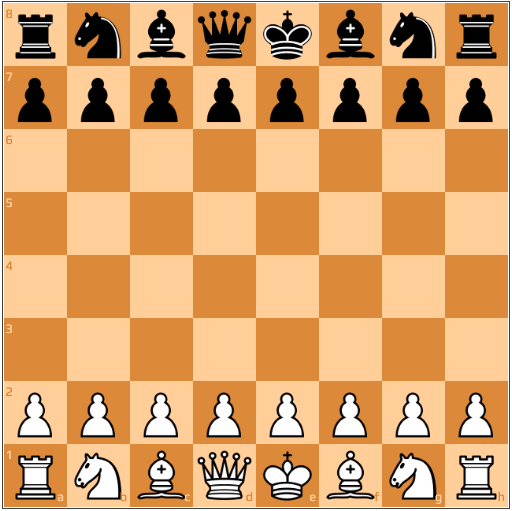
Chess pieces are the elements that players move on the chessboard during a game. Each side begins with 16 pieces: eight pawns, two bishops, two knights, two rooks, one queen, and one king. There are six types of pieces, each with unique movement and value.
The Pawn
Each side starts with eight pawns. White’s pawns are on the second rank, and Black’s pawns are on the seventh rank. Pawns are the least powerful pieces and are worth one point. On its first move, a pawn can move forward one or two squares. After that, it can move only one square forward at a time. Pawns capture diagonally to the left or right.
The Bishop
Each side has two bishops, one on a light square and one on a dark square. White’s bishops start on c1 and f1, while Black’s start on c8 and f8. Bishops are considered minor pieces and are worth three points. They move diagonally across the board and can capture an enemy piece by occupying its square. Their movement forms an “X” shape.
The Knight
Each side has two knights. White’s knights are on b1 and g1, while Black’s are on b8 and g8. Knights are minor pieces and are worth three points. They are the only pieces that can jump over other pieces. Knights move in an “L-shape.” They move one square horizontally and two vertically, or two squares horizontally and one vertically. They capture only the piece they land on.
The Rook
Each side has two rooks, located in the corners. White’s rooks are on a1 and h1, while Black’s are on a8 and h8. Rooks are major pieces and are worth five points. They can move any number of squares horizontally or vertically, as long as the path is not blocked by other pieces.
The Queen
The queen is the most powerful piece and is worth nine points. Each side has one queen. White’s queen is on d1, and Black’s queen is on d8. The queen can move any number of squares horizontally, vertically, or diagonally. It combines the powers of the rook and bishop.
The King
The king is the most important piece, and the objective of chess is to checkmate the opponent’s king. Each side has one king. White’s king is on e1, and Black’s king is on e8. The king can move one square in any direction. When the king is under threat, it is said to be in “check.”
Chess Board
Problem Statement
Chess is a game where a battle of minds takes place between two players. It is a strategic board game that requires patience, concentration, intuition, and perseverance. Chess involves careful thinking, planning, and problem-solving, and it often takes time to anticipate and counter the opponent’s moves.
In today’s connected world, players can interact and compete with others despite being in different locations. This project focuses on developing an online chess game that can be played either alone or with other players remotely. The main goal is to provide an engaging and enjoyable gaming experience, while also allowing players to connect with opponents, learn new strategies, and discuss chess moves.
Methodology
HMI Principles Implemented in the Project
Place Users at the Centre
A good user interface (UI) focuses on the user. It is easy and natural to use, avoids confusion, and meets the user’s needs. Human-centred design helps prioritize people first and design second, ensuring that interfaces serve the user effectively.
Strive for Clarity
The purpose of a UI is to allow users to interact with the application or website. Avoid elements that confuse users or do not aid interaction. Clear design helps users achieve their goals efficiently.
Minimise Actions and Steps Per Screen
Tasks should be streamlined so they require as few steps as possible. Each screen should have one primary focus. The main action should be prominent, while secondary actions should be less visually emphasized and positioned appropriately.
Aim for Simplicity
A UI should be simple and elegant. Timeless designs work best when combined with modern touches that enhance usability without adding complexity.
Be Consistent
Consistency creates familiarity, which improves usability. A consistent design is predictable and easy to understand. Both internal and external consistency are important. Design systems can help maintain this uniformity across the interface.
Make Your UI Invisible
A great UI allows users to interact with the product without friction. Users should focus on the task, not on figuring out how to use the interface.
Provide Useful Feedback
Feedback can be visual, auditory, or tactile. Every action should provide information about success or failure. Feedback answers questions related to location, status, future status, and outcomes. For example, a navigation item changing color when hovered over indicates it is clickable, and buttons should clearly look like buttons.
Reduce Cognitive Load
UI principles aim to reduce the mental effort required by users. Interfaces should be intuitive and minimize unnecessary thinking.
Make It Accessible
Design should consider accessibility. Online interfaces should ensure that users with visual or other impairments can access and use the product effectively.
Be Flexible
The UI should work across multiple platforms. It may require adjustments for different devices and operating systems, but it should remain functional and visually consistent.
Maintain Visual Structure
A consistent visual structure creates familiarity and reduces user anxiety. Key elements include visual hierarchy, colour scheme, consistent navigation, reuse of elements, and visual order using grids.
Dialogues Should Result in Closure
Actions should have a clear beginning, middle, and end, with feedback at each stage. For example, in an online purchase, the process moves from browsing and selection to checkout and confirmation.
Provide a Clear Next Step
After an interaction, guide the user to the next step. This could be a “back to top” button, a pointer to additional information, or another actionable step that helps the user achieve their goals.
Node.js
- Node.js is an open-source and cross-platform JavaScript runtime environment. It is widely used for almost any type of project.
- Node.js runs the V8 JavaScript engine, which is the core of Google Chrome, outside of the browser. This makes Node.js highly performant.
- A Node.js application runs in a single process without creating a new thread for every request. It provides a set of asynchronous I/O primitives in its standard library, preventing JavaScript code from blocking. Most libraries in Node.js follow non-blocking paradigms, making blocking behaviour the exception rather than the norm.
- When Node.js performs an I/O operation, such as reading from the network, accessing a database, or working with the filesystem, it does not block the thread. Instead, the operation resumes when the response is ready.
- This allows Node.js to handle thousands of concurrent connections with a single server without the overhead of managing multiple threads, which can be a major source of bugs.
- Node.js has a unique advantage because millions of frontend developers who write JavaScript for the browser can now write server-side code as well, without learning a completely different language.
- Node.js fully supports new ECMAScript standards. You do not need to wait for users to update their browsers because the server controls the ECMAScript version. Experimental features can also be enabled by running Node.js with specific flags.
Socket Programming
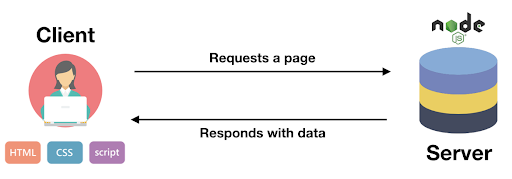
- A socket is a communication endpoint that can be named and addressed within a network. Socket programming demonstrates how to use socket APIs to establish communication links between local and remote processes.
- The processes using a socket can reside on the same system or on different systems across networks. Sockets are useful for both standalone and network applications.
- Sockets allow processes to exchange information on the same machine or across a network, distribute work to the most efficient system, and provide easy access to centralized data.
- Socket application programming interfaces (APIs) are the standard for TCP/IP networking. A wide range of operating systems support socket APIs. For example, i5/OS sockets support multiple transport methods and networking protocols. Socket system functions and network functions are thread-safe, ensuring reliable concurrent operations.
Socket Programming with Node.js
Hosting on Heroku
The project is hosted on Heroku, a cloud platform as a container-based service (PaaS). Heroku allows developers to launch, manage, and scale modern applications with ease. It is an open-source platform suitable for web applications, machine learning, and data science projects, making it simple to develop and deploy customized web apps. Web applications hosted on Heroku are platform-independent and can be accessed by anyone with an Internet connection. The code runs on a back-end server, which processes incoming requests and responds using standard protocols compatible with all browsers.

Heroku
Deployment Steps
- Install Node.js dependencies using
package.json. - Build and run the application locally with the command:
heroku local web. - Initialize a Git repository and commit the changes.
- Deploy the application to Heroku using the Heroku CLI.
- Open the deployed app by running:
heroku open.
Implementation
The project is implemented using Node.js and socket programming to enable real-time multiplayer functionality. The application is hosted on Heroku as a cloud platform. The source code and all project files are available on GitHub: https://github.com/Amey-Thakur/ONLINE-CHESS-GAME
Index.html
Show Code
<!DOCTYPE html>
<html>

<head>
    <title>AMEY</title>
    <link rel="icon" href="./img/icon.jpg">
    <link rel="stylesheet" type="text/css" href="./css/semantic.min.css">
    <link rel="stylesheet" href="./css/chessboard-1.0.0.min.css">
    <link rel="stylesheet" href="./css/styles.css">
</head>

<body>
    <audio id="myAudio">
        <source src="./mp3/soundMove.mp3" type="audio/mpeg">
        Your browser does not support the audio element.
    </audio>
    <audio id="messageTone">
        <source src="./mp3/insight.mp3" type="audio/mpeg">
        Your browser does not support the audio element.
    </audio>
    <!-- Navbar -->
    <div>
        <div style="margin: 0; border-bottom: 4px solid gray; padding: 3px 0; " class="ui secondary menu">
            <img src="./img/icon.png" style="width:80px;height:80px;">
            <h2 style="text-decoration: underline;">CHESS GAME</h2>
            <div class="right menu">
                <div style="margin-top:20px; height: 40px; padding-right: 20px; margin-right: 15px;"
                    class="ui labeled button" tabindex="0">
                    <div class="ui button">
                        <i class="user icon"></i> #PLAYERS
                    </div>
                    <a class="ui basic label">
                        <span id="players">0</span>
                    </a>
                </div>
                <div style="margin-top:20px; height: 40px; padding-left: 20px;  margin-right: 15px;"
                    class="ui labeled button" tabindex="0">
                    <div class="ui button">
                        <i class="star icon"></i> #ROOMS
                    </div>
                    <a class="ui basic label">
                        <span id="rooms">0</span>
                    </a>
                </div>
            </div>
        </div>
    </div>
    <div>
        <div id="gameMode">
            <h1 style="text-align: center; margin: 10px; font-size: 35px;"> GAME MODE</h1>
            <div style="text-align:center;">
                <button class="game ui black button " id="singlePlayer">SINGLE PLAYER</button>
            </div>
            <div style="text-align:center;">
                <button class="game ui black button " id="multiPlayer">MULTI PLAYER</button>
            </div>
        </div>
        <div id="joinFormDiv" style="display: none;">
            <form id="joinForm">
                <h1 style="text-align: center; margin: 10px; font-size: 35px;">START GAME</h1>
                <div style="text-align:center;">
                    <input class="formInput" type="text" placeholder="Name" style="padding: 10px;">
                </div>
                <div style="text-align:center;">
                    <input class="formInput" type="text" placeholder="Room" style="padding: 10px;">
                </div>
                <div id="roomDropdownP" style="text-align:center;  height: 50px; margin: 10px; padding: 0 4px; ">
                    <div id="roomDropdown" class="ui fluid search selection dropdown"
                        style="border: 1px solid gray; width: 300px; margin:auto;">
                        <input type="hidden" name="country">
                        <i class="dropdown icon"></i>
                        <div class="default text">SELECT ROOM</div>
                        <div class="menu" id="dropRooms">
                            <!-- <div class="item" data-value="af"><i class="icon star"></i>Afghanistan</div>
                            <div class="item" data-value="ar"><i class="icon star"></i>Argentina</div> -->
                        </div>
                    </div>
                </div>
                <div style="text-align:center;">
                    <button class="game ui black button " id="joinButton">JOIN</button>
                </div>
                <div style="text-align:center;">
                    <p id="message"></p>
                </div>
            </form>
        </div>
        <!-- /Input Form -->
        <div>
            <!-- Chess Board -->
            <div id="chessGame" style="display: none;">
                <!-- Color Schemes -->
                <div style="text-align: center; margin: 10px;">
                    <button id="grey_board" class="ui button black color_b">GREY</button>
                    <button id="orange_board" class="ui button grey color_b">ORANGE</button>
                    <button id="green_board" class="ui button grey color_b">GREEN</button>
                    <button id="blue_board" class="ui button grey color_b">BLUE</button>
                </div>
                <!-- Status and PGN -->
                <div id="statusPGN" style="text-align: center; display: none;">
                    <div>
                        <label>
                            <h3><strong>STATUS</strong></h3>
                        </label>
                        <div id="status">YOUR TURN</div>
                    </div>
                    <div>
                        <label>
                            <h3><strong>HISTORY</strong></h3>
                        </label>
                        <div id="pgn" style="overflow: auto; white-space: nowrap; width: 500px; margin: auto;"></div>
                    </div>
                </div>
                <div id="myBoard" style="width: 569px; margin: auto; margin-top: 10px; margin-bottom: 10px;"></div>
                <div style="text-align: center; margin-bottom: 20px;">
                    <a href="/" class="ui button black" style="width: 569px;">LEAVE GAME</a>
                </div>
            </div>
        </div>
    </div>
    <!-- Chatting window -->
    <div id="chat"
        style=" background-color: white; display: none; text-align: right; position: fixed; bottom: 0; right: 0; width: 400px; margin-right: 10px; border: 2px solid black;">
        <div class="ui button grey" style="border-radius: 0; width: 100%; padding: 15px; font-size: 16px;"
            id="messageBox">
            MESSAGES
        </div>
        <div id="chatBox" style="display: none; padding: 12px;">
            <div id="chatContent" style="height: 240px; overflow-y: auto; word-break: break-all; ">
                <!-- <div class="myMessage">Hello</div>
                <div class="youMessage">his</div> -->
            </div>
            <form style="margin-bottom: 0;" class="ui form">
                <div style="display: flex; justify-content: space-around;">
                    <input class="form-control " id="inputMessage" type="text" placeholder="Enter a Message"
                        style="margin-right: 10px;">
                    <button class="ui black button" id="send">SEND</button>
                </div>
            </form>
        </div>
    </div>
    <div
        style="background-color: black; color: white; margin-top:auto; padding: 15px; text-align: center; font-size: 15px;">
        <i>"Avoid the crowd. Do your own thinking independently. Be the chess player, not the chess piece"</i></div>
    <script src="https://code.jquery.com/jquery-3.1.1.min.js"
        integrity="sha256-hVVnYaiADRTO2PzUGmuLJr8BLUSjGIZsDYGmIJLv2b8=" crossorigin="anonymous"></script>
    <script src="./js/semantic.min.js"></script>
    <script src="/socket.io/socket.io.js"></script>
    <script src="./js/chessboard-1.0.0.min.js"></script>
    <script src="https://cdnjs.cloudflare.com/ajax/libs/chess.js/0.10.2/chess.js" integrity="sha384-s3XgLpvmHyscVpijnseAmye819Ee3yaGa8NxstkJVyA6nuDFjt59u1QvuEl/mecz"
        crossorigin="anonymous"></script>
    <script src="./js/app.js"></script>
</body>
</html>
Style.css
Show Code
html {
    margin: 0;
    padding: 0;
    height: 100%;
}

body {
    margin: 0;
    padding: 0;
    height: 100%;
    overflow: visible;
    display:flex;
    flex-direction:column;
}
 #singlePlayer, #multiPlayer, #joinButton{
    margin: 10px;
    width: 300px;
    padding: 20px;
    font-size: 22px;
 }

 #gameMode, #joinFormDiv{
    padding: 10px;
    margin-top: 8%;
 }

 .black-3c85d {
    background-color: #E1E1E1;
    color: #FFFFFF;
}

.white-1e1d7 {
    background-color: #FFFFFF;
    color: #E1E1E1;
}

#grey_board, #orange_board, #green_board, #blue_board{
    margin: 6px;
    width: 130px;
}
.formInput {
    border: 1px solid gray;
    height: 50px;
    border-radius: 4px;
    width: 300px;
    margin: 10px;
    padding: 0 4px;
}

.myMessage{
    text-align: right;
    padding: 8px;
    background-color: #E0E0E0;
    font-size: 17px;
    margin-bottom: 10px;
    margin-right: 7px;
    clear:both;
    float : right;
    border-radius: 5px;
    border-left: 12px solid transparent;
    border-right: 12px solid transparent;
}

.youMessage{
    text-align: left;
    padding: 8px;
    background-color: #616161;
    color: white;
    font-size: 17px;
    margin-bottom: 10px;
    clear:both;
    border-radius: 5px;
    float : left;
}
App.js
Show Code
const formEl = document.querySelectorAll('#joinForm > div > input')
const joinButtonEl = document.querySelector('#joinButton')
const messageEl = document.querySelector('#message')
const statusEl = document.querySelector('#status')
const ChatEl = document.querySelector('#chat')
const sendButtonEl = document.querySelector('#send')
const roomsListEl = document.getElementById('roomsList');
const myAudioEl = document.getElementById('myAudio');
const singlePlayerEl = document.getElementById('singlePlayer');
const multiPlayerEl = document.getElementById('multiPlayer');
const totalRoomsEl = document.getElementById('rooms')
const totalPlayersEl = document.getElementById('players')
const chatContentEl = document.getElementById('chatContent')
var config = {};
var board = null;
var game = new Chess()
var turnt = 0;

// initializing semantic UI dropdown
$('.ui.dropdown')
    .dropdown();

// function for defining onchange on dropdown menus
$("#roomDropdown").dropdown({
    onChange: function (val) {
        console.log(val)
        console.log('running the function')
        formEl[1].value = val
    }
});

function onDragStart2(source, piece, position, orientation) {
    // do not pick up pieces if the game is over
    if (game.game_over()) {
        if (game.in_draw()) {
            alert('Game Draw!!');
        }
        else if (game.in_checkmate())
            if (turnt === 1) {
                alert('You won the game!!');
            } else {
                alert('You lost!!');
            }
        return false
    }

    // only pick up pieces for White
    if (piece.search(/^b/) !== -1) return false
}

function makeRandomMove() {
    var possibleMoves = game.moves()

    // game over
    if (possibleMoves.length === 0) {
        return;
    }

    var randomIdx = Math.floor(Math.random() * possibleMoves.length)
    game.move(possibleMoves[randomIdx]);
    myAudioEl.play();
    turnt = 1 - turnt;
    board.position(game.fen());
}
function onDrop2(source, target) {
    // see if the move is legal
    var move = game.move({
        from: source,
        to: target,
        promotion: 'q' // NOTE: always promote to a queen for example simplicity
    })
    myAudioEl.play();
    // illegal move
    if (move === null) return 'snapback'
    turnt = 1 - turnt;
    // make random legal move for black
    window.setTimeout(makeRandomMove, 250)
}
// update the board position after the piece snap
// for castling, en passant, pawn promotion
function onSnapEnd2() {
    board.position(game.fen())
}

singlePlayerEl.addEventListener('click', (e) => {
    e.preventDefault();
    document.getElementById('gameMode').style.display = "none";
    document.querySelector('#chessGame').style.display = null;
    config = {
        draggable: true,
        position: 'start',
        onDragStart: onDragStart2,
        onDrop: onDrop2,
        onSnapEnd: onSnapEnd2
    }
    board = Chessboard('myBoard', config);
})
//Connection will be established after webpage is refreshed
const socket = io()
//Triggers after a piece is dropped on the board
function onDrop(source, target) {
    //emits event after piece is dropped
    var room = formEl[1].value;
    myAudioEl.play();
    socket.emit('Dropped', { source, target, room })
}
//Update Status Event
socket.on('updateEvent', ({ status, fen, pgn }) => {
    statusEl.textContent = status
    fenEl.textContent = fen
    pgnEl.textContent = pgn
})
socket.on('printing', (fen) => {
    console.log(fen)
})
//Catch Display event
socket.on('DisplayBoard', (fenString, userId, pgn) => {
    console.log(fenString)
    //This is to be done initially only
    if (userId != undefined) {
        messageEl.textContent = 'Match Started!! Best of Luck...'
        if (socket.id == userId) {
            config.orientation = 'black'
        }
        document.getElementById('joinFormDiv').style.display = "none";
        document.querySelector('#chessGame').style.display = null
        ChatEl.style.display = null
        document.getElementById('statusPGN').style.display = null
    }

    config.position = fenString
    board = ChessBoard('myBoard', config)
    document.getElementById('pgn').textContent = pgn
})
//To turn off dragging
socket.on('Dragging', id => {
    if (socket.id != id) {
        config.draggable = true;
    } else {
        config.draggable = false;
    }
})
//To Update Status Element
socket.on('updateStatus', (turn) => {
    if (board.orientation().includes(turn)) {
        statusEl.textContent = "Your turn"
    }
    else {
        statusEl.textContent = "Opponent's turn"
    }
})
//If in check
socket.on('inCheck', turn => {
    if (board.orientation().includes(turn)) {
        statusEl.textContent = "You are in Check!!"
    }
    else {
        statusEl.textContent = "Opponent is in Check!!"
    }
})
//If win or draw
socket.on('gameOver', (turn, win) => {
    config.draggable = false;
    if (win) {
        if (board.orientation().includes(turn)) {
            statusEl.textContent = "You lost, better luck next time :)"
        }
        else {
            statusEl.textContent = "Congratulations, you won!!"
        }
    }
    else {
        statusEl.value = 'Game Draw'
    }
})
//Client disconnected in between
socket.on('disconnectedStatus', () => {
    alert('Opponent left the game!!')
    messageEl.textContent = 'Opponent left the game!!'
})
//Receiving a message
socket.on('receiveMessage', (user, message) => {
    var chatContentEl = document.getElementById('chatContent')
    //Create a div element for using bootstrap
    chatContentEl.scrollTop = chatContentEl.scrollHeight;
    var divEl = document.createElement('div')
    if (formEl[0].value == user) {
        divEl.classList.add('myMessage');
        divEl.textContent = message;
    }
    else {
        divEl.classList.add('youMessage');
        divEl.textContent = message;
        document.getElementById('messageTone').play();
    }
    var style = window.getComputedStyle(document.getElementById('chatBox'));
    if (style.display === 'none') {
        document.getElementById('chatBox').style.display = 'block';
    }
    chatContentEl.appendChild(divEl);
    divEl.focus();
    divEl.scrollIntoView();
})
//Rooms List update
socket.on('roomsList', (rooms) => {
    // roomsListEl.innerHTML = null;
    // console.log('Rooms List event triggered!! ',  rooms);
    totalRoomsEl.innerHTML = rooms.length
    var dropRooms = document.getElementById('dropRooms')
    while (dropRooms.firstChild) {
        dropRooms.removeChild(dropRooms.firstChild)
    }
    // added event listener to each room
    rooms.forEach(x => {
        var roomEl = document.createElement('div')
        roomEl.setAttribute('class', 'item')

        roomEl.setAttribute('data-value', x)
        roomEl.textContent = x;
        dropRooms.appendChild(roomEl)
    })
})
socket.on('updateTotalUsers', totalUsers => {
    console.log('event listened')
    totalPlayersEl.innerHTML = totalUsers;
})
//Message will be sent only after you click the button
sendButtonEl.addEventListener('click', (e) => {
    e.preventDefault()
    var message = document.querySelector('#inputMessage').value
    var user = formEl[0].value
    var room = formEl[1].value
    document.querySelector('#inputMessage').value = ''
    document.querySelector('#inputMessage').focus()
    socket.emit('sendMessage', { user, room, message })
})
//Connect clients only after they click Join
joinButtonEl.addEventListener('click', (e) => {
    e.preventDefault()
    var user = formEl[0].value, room = formEl[1].value
    if (!user || !room) {
        messageEl.textContent = "Input fields can't be empty!"
    }
    else {
        joinButtonEl.setAttribute("disabled", "disabled");
        formEl[0].setAttribute("disabled", "disabled")
        document.querySelector('#roomDropdownP').style.display = 'none';
        formEl[1].setAttribute("disabled", "disabled")
        //Now Let's try to join it in room // If users more than 2 we will
        socket.emit('joinRoom', { user, room }, (error) => {
            messageEl.textContent = error
            if (alert(error)) {
                window.location.reload()
            }
            else    //to reload even if negative confirmation
                window.location.reload();
        })
        messageEl.textContent = "Waiting for other player to join"
    }
})

multiPlayerEl.addEventListener('click', (e) => {
    e.preventDefault();
    document.getElementById('joinFormDiv').style.display = "block";
    document.getElementById('gameMode').style.display = "none";
    //Server will create a game and clients will play it
    //Clients just have to diaplay the game
    var board = ChessBoard('myBoard')
    config = {
        draggable: false,   //Initially
        position: 'start',
        onDrop: onDrop,
        orientation: 'white'
    }
})
const applyColorScheme = (black, white) => {
    const blackEl = document.querySelectorAll('.black-3c85d');
    for (var i = 0; i < blackEl.length; i++) {
        blackEl[i].style.backgroundColor = black;
        blackEl[i].style.color = white;
    }
    const whiteEl = document.querySelectorAll('.white-1e1d7');
    for (var i = 0; i < whiteEl.length; i++) {
        whiteEl[i].style.backgroundColor = white;
        whiteEl[i].style.color = black;
    }
}
//For removing class from all buttons
const removeClass = () => {
    const buttonEl = document.querySelectorAll('.color_b');
    for (var i = 0; i < buttonEl.length; i++) {
        buttonEl[i].classList.remove('black');
        buttonEl[i].classList.remove('grey');
    }
}
// Colour Buttons
document.getElementById('grey_board').addEventListener('click', e => {
    e.preventDefault();
    removeClass();
    document.getElementById('grey_board').classList.add('black');
    document.getElementById('orange_board').classList.add('grey');
    document.getElementById('green_board').classList.add('grey');
    document.getElementById('blue_board').classList.add('grey');
    applyColorScheme("#E1E1E1", "#FFFFFF");
})

document.getElementById('orange_board').addEventListener('click', e => {
    e.preventDefault();
    removeClass();
    document.getElementById('grey_board').classList.add('grey');
    document.getElementById('orange_board').classList.add('black');
    document.getElementById('green_board').classList.add('grey');
    document.getElementById('blue_board').classList.add('grey');
    applyColorScheme("#D18B47", "#FFCE9E");
})

document.getElementById('green_board').addEventListener('click', e => {
    e.preventDefault();
    removeClass();
    document.getElementById('grey_board').classList.add('grey');
    document.getElementById('orange_board').classList.add('grey');
    document.getElementById('green_board').classList.add('black');
    document.getElementById('blue_board').classList.add('grey');
    applyColorScheme("#58AC8A", "#FFFFFF");
})

document.getElementById('blue_board').addEventListener('click', e => {
    e.preventDefault();
    removeClass();
    document.getElementById('grey_board').classList.add('grey');
    document.getElementById('orange_board').classList.add('grey');
    document.getElementById('green_board').classList.add('grey');
    document.getElementById('blue_board').classList.add('black');
    applyColorScheme("#727FA2", "#C3C6BE");
})

// Messages Modal
document.getElementById('messageBox').addEventListener('click', e => {
    e.preventDefault();
    var style = window.getComputedStyle(document.getElementById('chatBox'));
    if (style.display === 'none') {
        document.getElementById('chatBox').style.display = 'block';
    } else {
        document.getElementById('chatBox').style.display = 'none';
    }
})
Results
The project resulted in a fully functional online chess game, accessible as a web application: https://onlinechess-game.herokuapp.com
Features and Screenshots
Home Page
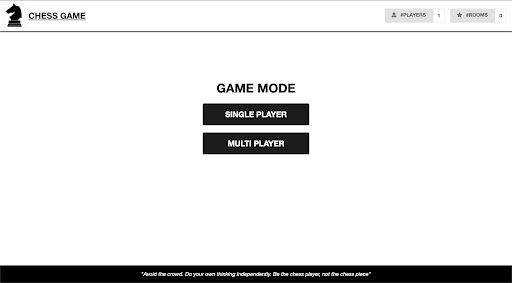
The landing page provides access to all game modes and settings.
Home Page
Single Player Mode
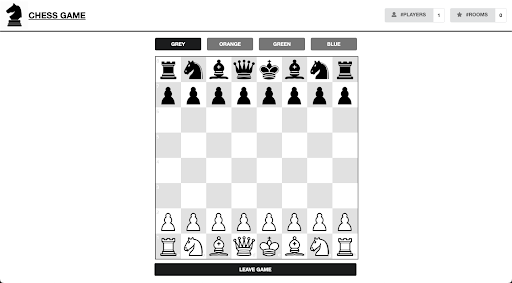
Users can play against the computer with different difficulty levels.
Single Player Mode
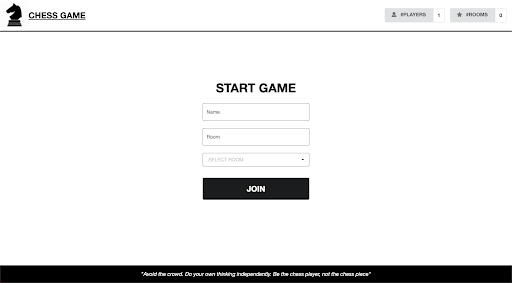
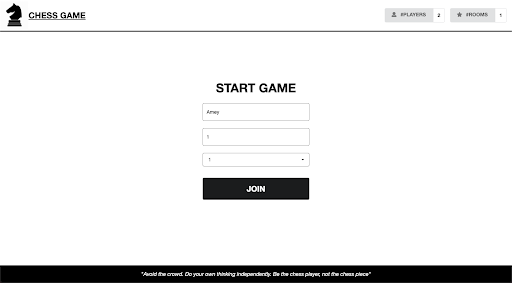
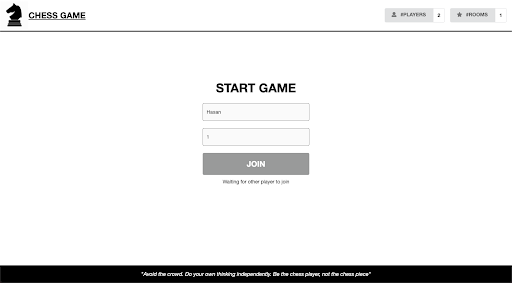
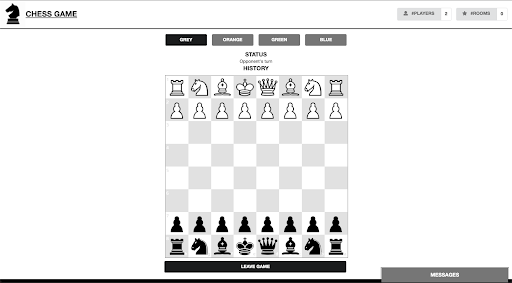
Multiplayer Mode
Players can compete against others in real-time using socket-based communication.
(a) Multiplayer Mode
(b) Multiplayer Mode
(c) Multiplayer Mode
(d) Multiplayer Mode
Chat Window
A chat feature allows players in multiplayer mode to send messages to each other during the game.
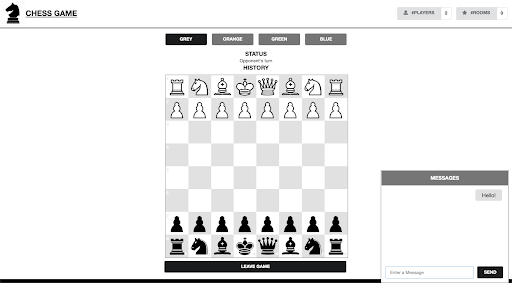
(a) Chat window for players to send message to each other
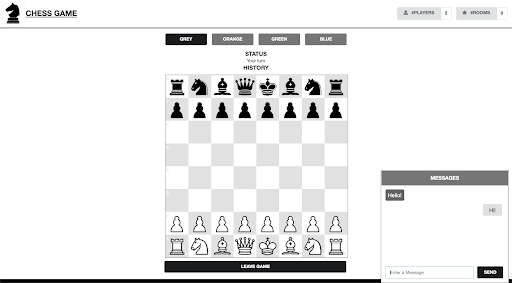
(b) Chat window for players to send message to each other
Customizable Colour Themes
Users can personalize the chessboard with different colour themes, including:
- Grey
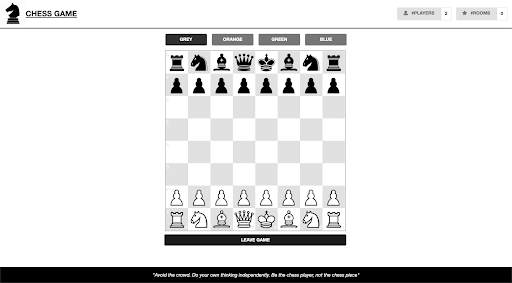
Grey Theme
- Orange
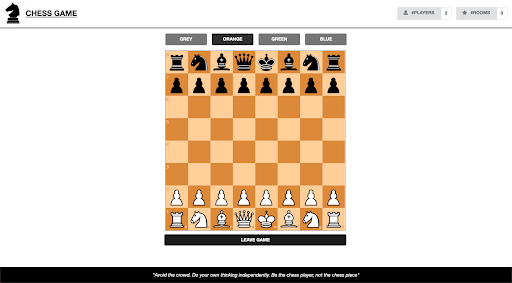
Orange Theme
- Green
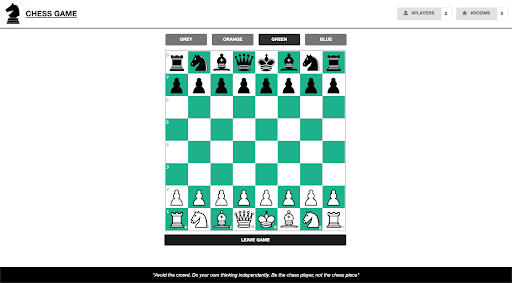
Green Theme
- Blue
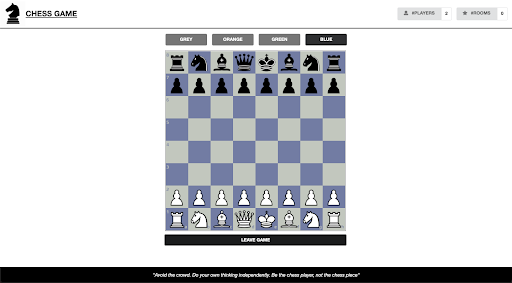
Blue Theme
YouTube Demonstration
Conclusion
The proposed system demonstrates that the online chess game is designed with Human-Machine Interaction principles in mind. The web application is simple, intuitive, and allows users to play chess in two modes: single-player and multiplayer. In multiplayer mode, users can communicate with opponents through a chat window.
The design of the website is classic and elegant, with minimal colours and elements, keeping the focus on the goal: playing chess. Users can customize the theme of the game according to their preference. During gameplay, users are informed about the possible movements of each piece. In multiplayer mode, if an opponent leaves the game midway, the browser notifies the user immediately. This ensures that players are well informed and can make decisions without confusion.
The web application, developed using Node.js, has been deployed on the Heroku platform and is accessible to anyone with an Internet connection. For future work, additional features can be added, such as a tutorial portal for beginners, providing tips and guidance on how to play chess effectively.
Presentation
Additional Resources
Project Source & Study Materials
Access the complete source code, project report, and related Human-Machine Interaction (HMI) study materials via the links below:
Citation
Please cite this work as:
Thakur, Amey. "Online Chess Game". AmeyArc (Apr 2022). https://amey-thakur.github.io/posts/2022-04-15-online-chess-game/.Or use the BibTex citation:
@article{thakur2022onlinechessgame,
  title   = "Online Chess Game",
  author  = "Thakur, Amey",
  journal = "amey-thakur.github.io",
  year    = "2022",
  month   = "Apr",
  url     = "https://amey-thakur.github.io/posts/2022-04-15-online-chess-game/"
}