Special thanks to Mega Satish for her meaningful contributions, support, and wisdom that helped shape this work.
Clock discrepancies are troublesome in distributed systems and pose major difficulties. To avoid mistakes, the clocks of separate CPUs must be synced. This is to ensure that communication and resource sharing are as efficient as possible. As a result, the clocks must be constantly monitored and adjusted. Otherwise, the clocks drift apart. Clock skew causes a disparity in the time values of two clocks. Both of these issues must be solved in order to make effective use of distributed system characteristics. In this study, we briefly explored the features of distributed systems and its algorithms.
Introduction
Distributed systems and its types
Distributed System (DS) is a collection of computers connected via a high-speed communication network [1]. A distributed system is one in which interconnected hardware and software interact and coordinate their operations only through exchanging messages.
There are two types of Distributed Systems:
- Homogeneous Distributed Systems:
- It is a distributed system such that all nodes have identical hardware, the same type of architecture, and operating system.
- Heterogeneous Distributed Systems:
- It is a distributed system such that each node has its own operating system and machine architecture. Each node in a distributed system can share its resources, e.g., the producer-consumer processes and the client-server processes, sharing a printer or scanner. However, resources are finite and can be distributed in either collaborative or competitive forms. Resources like a printer and scanner cannot be used by multiple processes simultaneously, so they must wait for one process to complete and then give a chance to the next process. Another instance is producer-consumer as well as client-server operations that operate in extensive cooperation.
Need to resynchronize the clocks
So there is a need for proper allocation of available resources, to preserve the state of resources and coordination between processes. Clock synchronization [2] is critical for resolving these problems. Clock synchronization can be implemented by using the physical clock and logical clock.
Issues in Clock Synchronization
A basic technique of clock synchronization [2][3] is for each node to submit a time query message to the real-time server. The node gets a reply message with the value of time t. This method has the following issues:
- Every node’s capacity to read the clock value of another node. This can raise errors due to delays in message communication between nodes. The time required to prepare, deliver, and get a blank message because of the lack of transmission problems and system load can be used to calculate delay.
- Time should never be reversed since it might lead to the recurrence of events or transactions, causing chaos in the system. Time going backwards is only a notion; it does not literally travel backwards.
Reasons for Delay in Synchronization
As discussed above, there are many reasons [3][4] for a communication delay that needs to be minimized to minimize delay and get a nearby accurate time.
- Communication Link Failure: For example, when sending a request message, the communication link is working properly and the message reaches the server. If at the time of receiving a message, the communication link may fail due to some break. And the client may not be able to get a reply message. After recovery, the reply reaches the client which contains a false time value.
- Fault Tolerance: If any failure happens during exchanging messages, the clock time may be incorrectly interpreted. So the system should be fault-tolerant so that it can work in a faulty situation and minimize the clock drift value.
- Propagation Time: Due to heavy traffic or congestion in the network, it may cause a large propagation time from server to client. It may cause the inaccurate reading of the clock value in the reply.
- Non-Receipt of Acknowledgement: It may be possible that due to the above reasons client will not get a reply within a round trip time and therefore it sends multiple requests to the server for synchronization.
- The Bandwidth of Communication Link: Due to the low bandwidth of communication links, congestion may occur in the network. As a result, requests for time will be unable to reach the server and reply messages will be unable to get to the client, affecting clock synchronization.
Clocks in Synchronization
In synchronization [2], there are two types of clocks.
- Physical Clock:
- Time isn’t a big issue in traditional centralized systems, where one or more CPUs share a common bus. The entire system shares the same understanding of time, right or wrong, it is consistent.
- In distributed systems, this is not the case. Every system, though, has its own timer that keeps the clock running. These clocks are based on the oscillation of a piezoelectric crystal or a similar integrated circuit. They are not flawless, but they are relatively precise, reliable, and accurate. This implies that the clocks will differ from the correct time. Every timer is different in terms of characteristics — characteristics that might change with time, temperature. Thus, each system’s time will drift away from the true time at a different rate — and perhaps in a different direction (slow or fast).
- It is feasible to coordinate physical clocks across several systems, but it will never be accurate. The drifting away from the real-time from each clock is something that happens in a distributed system.
- Logical Clock:
- Logical clocks mean creating a protocol on all computers in a distributed system so that the computers can keep a uniform ordering of happenings inside some virtual time range.
- In a distributed system, a logical clock is a technique for recording temporal and causative links. Because distributed systems may lack a physically synchronized global clock, a logical clock provides for the global ordering of occurrences from various processes in certain systems.
Clock Synchronization Algorithms
Cristian Algorithm
Cristian’s Algorithm is a centralized clock synchronization algorithm used to synchronize time with a time server by client processes. This algorithm works well with a low latency network where the round-trip time — time duration between the start of request and end of corresponding response — is short as compared to the accuracy. It is an approach in which the client approaches the server.
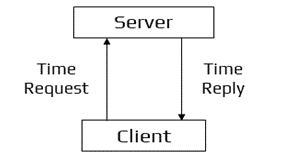
Cristian’s Algorithm Workflow
A client sends a request to a time server for its current value of the UTC time (Tₛ). The client records the time its request was submitted (T₀) and the time it got the response (T₁). Then, the client changes its current time at T₁ with the value received from the server plus its estimate of the delay in obtaining this value, resulting in the total time required to submit the query and get the response, which is (T₁ - T₀)/2. The new time value is thus Tₛ + (T₁ - T₀)/2.
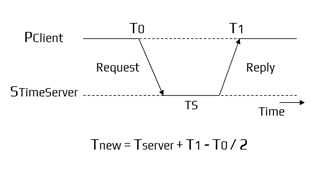
Cristian’s Algorithm Working
Algorithm:
- Let S be the time server and Tₛ be its time.
- Process P requests the time from S.
- After receiving the request from P, S prepares a response and appends time Tₛ from its own clock and then sends it back to P.
Python Implementation
import time
import random

def time_server():
    """
    Simulated time server returning its current UTC timestamp.
    In a real system, this would be an external trusted time server.
    """
    return time.time()

def cristian_client_request():
    """
    Implements Cristian's Algorithm from the client's perspective.
    The client sends a request to the server, measures round-trip time,
    and adjusts its clock accordingly.
    """

# T0: time when client sends the request
    T0 = time.time()

# Simulate network delay (for demonstration)
    network_delay = random.uniform(0.01, 0.05)
    time.sleep(network_delay)

# Server responds with its current time (Ts)
    Ts = time_server()

# Simulate network delay for the response
    time.sleep(network_delay)

# T1: time when client receives the response
    T1 = time.time()

# Cristian’s Algorithm adjustment:

# new_time = Ts + (T1 - T0)/2
    estimated_delay = (T1 - T0) / 2
    synchronized_time = Ts + estimated_delay

    print("=== Cristian's Algorithm Clock Synchronization ===")
    print(f"Client send time (T0):       {T0}")
    print(f"Server time (Ts):            {Ts}")
    print(f"Client receive time (T1):    {T1}")
    print(f"Estimated one-way delay:     {estimated_delay}")
    print(f"Synchronized client time:    {synchronized_time}")

    return synchronized_time

# Run the demonstration
cristian_client_request()
Output Explanation:
- T₀: When the client sends the request.
- Tₛ: The server’s current time (inserted in the response).
- T₁: When the client receives the response.
- Estimated delay = (T₁ - T₀) / 2
- Adjusted client time = Tₛ + estimated delay
Berkeley Algorithm
The Berkeley Algorithm is a centralized clock synchronization mechanism in a distributed system that implies no computer has a precise timing source. The algorithm was developed by Gusella and Zatti at the University of California, Berkeley in 1989.
This algorithm is an example of an active time server approach: the time server periodically sends a message to all the computers in the group. When the message is received, each computer then sends back its own clock value to the time server. It is an approach in which the server approaches the client.
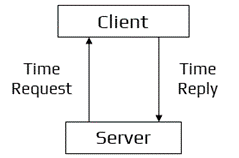
Berkeley’s Algorithm Workflow
Here the time server has prior knowledge of the approximate time required for the propagation of the message which is used to readjust the message. The time server then takes the average of all clock values of all the computers. All clocks should be readjusted to the current time which is the calculated average. The time server readjusts its own clock value to this value and instead of sending the current time to other computers, it sends the amount of time each computer needs for readjustment. The value may be positive or negative.
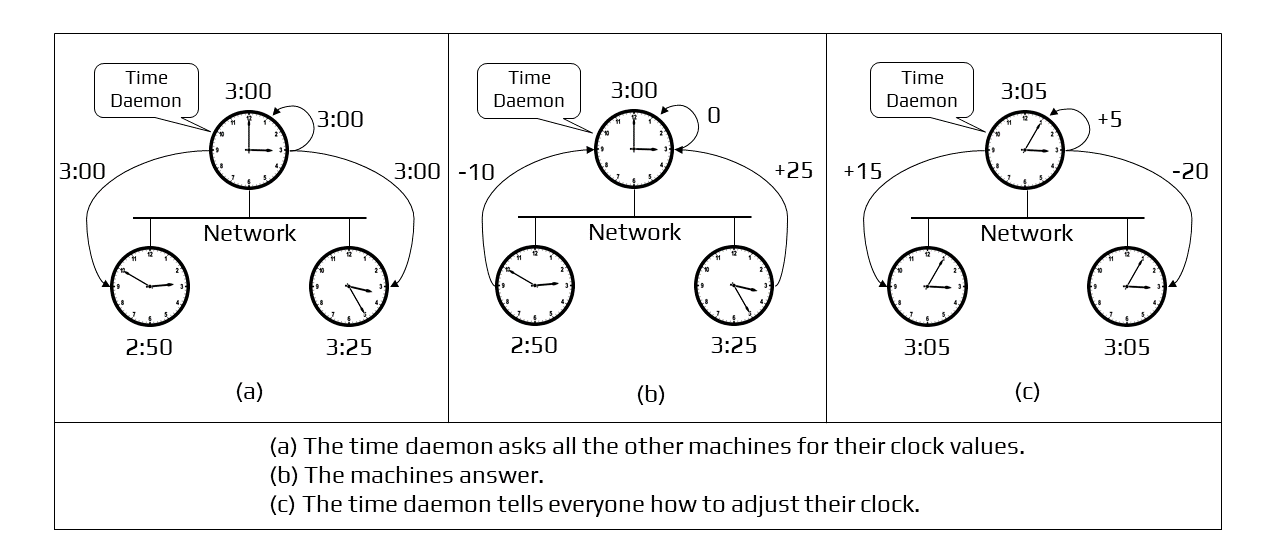
Berkeley’s Algorithm Working
Python Implementation
import time
import random

def berkeley_algorithm(clocks):
    """
    Simulates the Berkeley Clock Synchronization Algorithm.

    Parameters:
        clocks (dict): A dictionary of machines and their local clock values.

    Returns:
        dict: Adjustments each machine must apply (+/- seconds).
    """

    print("=== Berkeley Algorithm Clock Synchronization ===")

# Step 1: Time server polls all clients (server approaches clients)

# Assume the server is "S"
    server = "S"

# Server has an approximate idea of message propagation delay.

# To simulate, we add small random delays.
    adjusted_clocks = {}

    print("\n--- Step 1: Server polls clients and collects clock values ---")
    for machine, clock_value in clocks.items():

# Simulated propagation delay (real server compensates for this)
        delay = random.uniform(0.01, 0.05)
        time.sleep(delay)

        print(f"Received clock from {machine}: {clock_value} (with delay {delay:.3f}s)")
        adjusted_clocks[machine] = clock_value + delay

# Step 2: Server calculates average time
    print("\n--- Step 2: Server computes average of collected clocks ---")
    average_time = sum(adjusted_clocks.values()) / len(adjusted_clocks)
    print(f"Calculated average time: {average_time}")

# Step 3: Server computes adjustments needed for each machine
    print("\n--- Step 3: Server sends required adjustments to each machine ---")
    adjustments = {}
    for machine, clock_value in adjusted_clocks.items():
        adjustment = average_time - clock_value
        adjustments[machine] = adjustment
        print(f"{machine} adjustment: {adjustment:+.6f} seconds")

    return adjustments

# Example setup: Local clocks in a distributed system

# (In real systems, these are actual timestamps)
clocks = {
    "S": 100.0,     # Server's own clock
    "C1": 95.5,
    "C2": 102.2,
    "C3": 98.7
}

# Run the Berkeley Algorithm demo
berkeley_algorithm(clocks)
Output Explanation:
Server polls every machine
- The server actively approaches all clients.
- Each machine sends its local time.
- Small delays are added to simulate propagation time.
Server computes the average
- All collected (delay-adjusted) times are averaged:
- Average Time = (∑ Clocks) / N
Server calculates adjustments
- Instead of sending the new time directly, the server sends:
- +X seconds → the machine is behind
- –X seconds → the machine is ahead
- Every machine shifts its clock based on this.
- Instead of sending the new time directly, the server sends:
Network Time Protocol
Network Time Protocol is a standard followed by synchronization clocks on the internet. It is a decentralized algorithm. The Network Time Protocol (NTP) is a commonly employed Internet Engineering Task Force (IETF) standard (RFC 1305). (RFC 1305). The main servers are directly linked to a precise and dependable UTC time source. They are the foundations of hierarchical time service, with additional servers becoming operational as we go away from the roots. The common configuration includes UTC time servers at big government institutions at stratum 1, institutional time servers or Internet service providers’ time servers at stratum 2, and most users linking to academic time servers at stratum 3.
NTP may synchronize computers in three modes: first is the client-server mode, the second is the multicast mode, and the last is the symmetrical (peer) mode. In the client-server mode, the client makes queries to the server upon startup and on a regular basis thereafter. In a way similar to Cristian’s technique, it tracks the time at which the request and response are delivered and received in order to factor out network latency as much as feasible. Because the server multicasts its time value on a regular basis, the multicast mode is frequently more efficient. On a local area network with multicast capabilities, time resynchronization can be accomplished in a single message rather than two messages per client (e.g., Ethernet). However, in order to assess the network latency and adjust for it, the clients must first conduct a few client-server queries. However, if the network parameters change over time, the multicast mode’s accuracy will be inferior to that of the client-server mode.
The Simple Network Time Protocol (RFC 2030) is a Network Time Protocol adaptation that supports operation in a stateless remote procedure call mode or multicast mode. It is designed for use in contexts where a complete NTP implementation is neither required nor warranted. SNTP is intended to be utilized at the endpoints of the synchronization subnet (high stratum) rather than for time server synchronization.
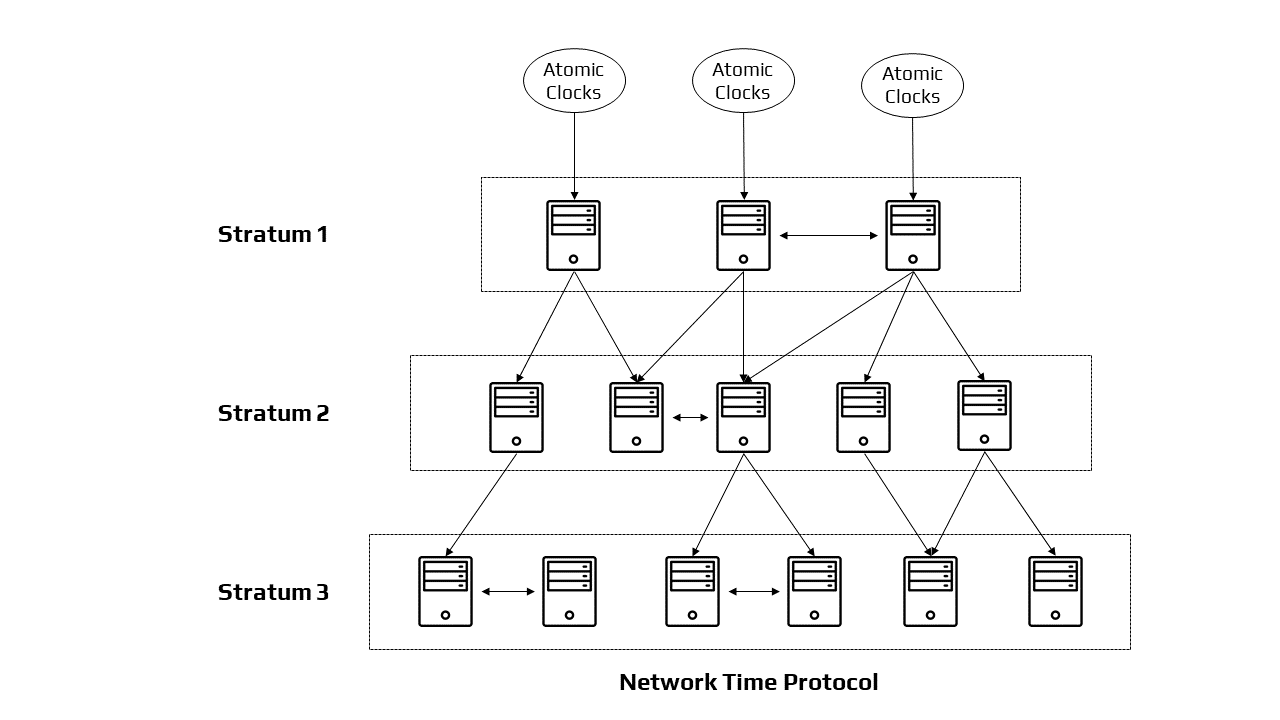
Architecture of Network Working Protocol
Python Implementation
import time
import random

# ----------------------------------------------------------

# Simulated NTP Server (Stratum 1)

# ----------------------------------------------------------
def ntp_server_time():
    """
    Simulated stratum-1 server time.
    In reality, these servers are synced to precise UTC sources
    (GPS, atomic clocks, national standards).
    """
    return time.time()

# ----------------------------------------------------------

# Client–Server Mode (similar to Cristian’s technique)

# ----------------------------------------------------------
def ntp_client_server_mode():
    """
    NTP Client–Server Mode:
    The client sends a request, timestamps the send/receive times,
    and estimates network delay to compute accurate time.
    """

    print("\n=== NTP: Client–Server Mode ===")

# T1: Client sends request
    T1 = time.time()

# Simulate network delay to server
    delay = random.uniform(0.01, 0.05)
    time.sleep(delay)

# Server receives request → prepares response (server timestamp T2)
    T2 = ntp_server_time()

# Simulate delay for response
    time.sleep(delay)

# T3: Client receives response
    T3 = time.time()

# NTP delay formula

# Offset = ((T2 - T1) + (T2 - T3)) / 2

# Round-trip delay = (T3 - T1) - (T2 - T2)  # simplified
    offset = ((T2 - T1) + (T2 - T3)) / 2

    synchronized_time = T3 + offset

    print(f"T1 (client send):      {T1}")
    print(f"T2 (server timestamp): {T2}")
    print(f"T3 (client receive):   {T3}")
    print(f"Estimated offset:      {offset:+.6f}")
    print(f"Synchronized time:     {synchronized_time}")

    return synchronized_time

# ----------------------------------------------------------

# Multicast Mode (server pushes time to many clients)

# ----------------------------------------------------------
def ntp_multicast_mode():
    """
    NTP Multicast Mode:
    The server broadcasts its time value regularly.
    Clients adjust based on stored network-delay estimates.
    """

    print("\n=== NTP: Multicast Mode ===")

# Simulated known latency (estimated earlier)
    known_latency = random.uniform(0.005, 0.020)

# Server periodically multicasts its timestamp
    server_time = ntp_server_time()
    print(f"Server multicast time: {server_time}")

# Clients receive the multicast message after a small delay
    time.sleep(known_latency)

    client_corrected_time = server_time + known_latency
    print(f"Client adjusted time (multicast): {client_corrected_time}")

# ----------------------------------------------------------

# Symmetric / Peer Mode (servers sync with each other)

# ----------------------------------------------------------
def ntp_peer_mode(peer1_time, peer2_time):
    """
    NTP Symmetric (Peer) Mode:
    Two servers exchange time with equal authority.
    Each adjusts based on the difference.
    """

    print("\n=== NTP: Symmetric / Peer Mode ===")
    print(f"Peer A initial clock: {peer1_time}")
    print(f"Peer B initial clock: {peer2_time}")

    difference = (peer1_time - peer2_time) / 2

# Each peer adjusts halfway toward the other
    peer1_new = peer1_time - difference
    peer2_new = peer2_time + difference

    print(f"Adjustment applied: {difference:+.6f}")
    print(f"Peer A new clock:   {peer1_new}")
    print(f"Peer B new clock:   {peer2_new}")

    return peer1_new, peer2_new

# Demonstration Execution

# ----------------------------------------------------------

# Client–Server mode
ntp_client_server_mode()

# Multicast mode
ntp_multicast_mode()

# Peer mode
peerA = 100000.0
peerB = 99995.5
ntp_peer_mode(peerA, peerB)
Output Explanation:
NTP Client–Server Mode
- Client timestamps request (T₁) and response (T₃)
- Server provides timestamp (T₂)
- Offset and network delay are estimated
- Client adjusts time (Conceptually similar to Cristian’s algorithm but more robust)
NTP Multicast Mode
- Server periodically multicasts time to many machines
- Clients adjust using previously learned delay estimates
- Efficient on LANs
- Less accurate if network conditions change
NTP Symmetric (Peer) Mode
- Two servers of similar stratum exchange time
- Both adjust halfway toward each other
- Used for server-to-server synchronization
Lamport’s Clock
In a distributed system, it is not necessary for the clocks to be absolutely synchronized. If two processes do not interact with each other, it is not necessary that their clocks need to be synchronized because the lack of synchronization would not matter. It is not important for all processes to agree on what the current time is but they should agree on the order in which events occur. In a distributed system, Lamport Clocks [5] are a basic mechanism for identifying the sequence of events. It gives a “Happened-Before” sequencing of occurrences. If there is no “happened-before” relationship, then the events are considered concurrent.
Algorithm: The “Happened before” relation between a and b is a → b, which means ‘a’ happened before ‘b’. The criteria for logical clocks are:
- Clock 1: Ci(a) < Ci(b), Ci → Logical Clock, if ‘a’ happened before ‘b’, then the time of ‘a’ will be less than ‘b’ in a particular process.
- Clock 2: Ci(a) < Cj(b), Clock value of Ci(a) is less than Cj(b).
Python Implementation
class Process:
    def __init__(self, name):
        self.name = name
        self.clock = 0  # Lamport logical clock

    def internal_event(self, event_name):
        """
        Internal event within the same process.
        Rule: Increment clock by 1.
        """
        self.clock += 1
        print(f"{self.name}: Internal event '{event_name}' → Clock = {self.clock}")

    def send_event(self, event_name):
        """
        Send a message to another process.
        Rule: Increment clock, attach timestamp.
        """
        self.clock += 1
        timestamp = self.clock
        print(f"{self.name}: Sent '{event_name}' → Clock = {self.clock}")
        return timestamp

    def receive_event(self, event_name, received_timestamp):
        """
        Receive a message.
        Rule: Clock = max(local clock, received_timestamp) + 1
        Enforces happened-before relation.
        """
        self.clock = max(self.clock, received_timestamp) + 1
        print(f"{self.name}: Received '{event_name}' with TS={received_timestamp} → Clock = {self.clock}")

# ------------------------------------------------------

# Demonstration of Lamport’s Logical Clock

# ------------------------------------------------------
P1 = Process("P1")
P2 = Process("P2")

print("\n=== Lamport Logical Clock Demonstration ===\n")

# P1 internal event
P1.internal_event("a")

# P1 sends message to P2
ts = P1.send_event("msg1")

# P2 receives message from P1
P2.receive_event("msg1", ts)

# P2 internal event
P2.internal_event("b")

# P2 sends message to P1
ts2 = P2.send_event("msg2")

# P1 receives message
P1.receive_event("msg2", ts2)
Output Explanation:
Logical Clock Rules (Lamport’s Rules)
- Rule 1 — Internal Event
- If a process performs an internal action:
- Cᵢ = Cᵢ + 1
- Rule 2 — Send Event
- When a process sends a message, it increments its clock and attaches the timestamp:
- Cᵢ = Cᵢ + 1
- Rule 3 — Receive Event
- When a process receives a message with timestamp Tₘ:
- Cⱼ = max(Cⱼ, Tₘ) + 1
- Rule 1 — Internal Event
Enforces Happened-Before Relationship
- If event a happens before b, then:
- C(a) < C(b)
“Happened-Before” Relation in This Example
- P1’s event a happens before sending msg1
- Sending msg1 happens before P2 receiving it
- Therefore:
- Cₚ₁(a) < Cₚ₂(receive msg1)
- If no happened-before relation exists → events are concurrent.
Vector Clock
In Lamport’s clock, if x → y, then T(x) < T(y). But this does not tell about the relationship between events x and y. That’s because Lamport’s clock do not capture causality. The causal relationship between messages is captured through vector clocks.
Vector Clock [9] is an algorithm that creates a partial ordering of occurrences and identifies causality breaches in a distributed system. Such clocks extend on vector time to provide for a logically coherent picture of the distributed system; they identify if a contributed activity has triggered another activity. It essentially captures all the causal relationships. This approach assists in labelling each process within the system with a vector (a list of numbers) including an integer for each local clock. As a result, for every N process, there will be a vector of size N.
Algorithm:
- All of the clocks are initialized to zero.
- When an internal event happens in a process, the number of the process’s logical clock in the vector is increased by one.
- Also, every time a process sends a message, the value of the process’s logical clock in the vector is incremented by one.
- Every time a process receives a message, the value of the process’s logical clock in the vector is incremented by one, and moreover, each element is adjusted by calculating the maximum value of the vector clock and the vector value in the incoming message.
Python Implementation
class Process:
    def __init__(self, pid, total_processes):
        self.pid = pid                      # Process ID (index of vector)
        self.vector = [0] * total_processes  # Vector clock initialized to all zeros

    def internal_event(self, event_name):
        """
        Rule: Increment own clock element.
        """
        self.vector[self.pid] += 1
        print(f"P{self.pid}: Internal event '{event_name}' → VC = {self.vector}")

    def send_event(self, event_name):
        """
        Rule: Increment own clock element before sending.
        Message carries a copy of the vector clock.
        """
        self.vector[self.pid] += 1
        message_vector = self.vector.copy()
        print(f"P{self.pid}: Send '{event_name}' → VC = {self.vector}")
        return message_vector

    def receive_event(self, event_name, incoming_vector):
        """
        Rule:
        1. Increment own clock element
        2. Take element-wise max between local and incoming vectors
        """
        self.vector[self.pid] += 1

# Update vector clock: element-wise max
        for i in range(len(self.vector)):
            self.vector[i] = max(self.vector[i], incoming_vector[i])

        print(f"P{self.pid}: Receive '{event_name}' with {incoming_vector} → VC = {self.vector}")

# ----------------------------------------------------------

# Demonstration of Vector Clocks

# ----------------------------------------------------------
print("\n=== Vector Clock Demonstration ===\n")

# Three processes: P0, P1, P2
P0 = Process(0, 3)
P1 = Process(1, 3)
P2 = Process(2, 3)

# Internal events
P0.internal_event("a")
P1.internal_event("b")

# P0 sends a message to P1
msg = P0.send_event("m1")
P1.receive_event("m1", msg)

# P1 internal event
P1.internal_event("c")

# P1 sends a message to P2
msg2 = P1.send_event("m2")
P2.receive_event("m2", msg2)

# P2 internal event
P2.internal_event("d")
Output Explanation:
Initialize clocks to zero
- Each process has a vector of length N (number of processes):
- [0, 0, 0]
Internal Event
- Rule: increment only your own index.
- Example (P1 internal event):
- [0, 0, 0] → [0, 1, 0]
Send Event
- Rule: increment own index, attach vector clock to message.
- Example (P0 sends to P1):
- [1, 0, 0] → send message with [2, 0, 0]
Receive Event
- Rules:
- Increment own index
- Take element-wise maximum with incoming vector
- Example (P1 receives from P0):
- Incoming: [2, 0, 0]
- Local before receive: [0, 2, 0]
- After merge: [max(0, 2), max(2, 0), max(0, 0)] = [2, 2, 0]
- Then increment P1’s clock: [2, 3, 0]
- Rules:
What Vector Clocks Achieve
- Vector Clock Ordering Rule
- Given two vector timestamps V(x) and V(y):
- x → y (x happened before y) if:
- V(x)[i] ≤ V(y)[i] for all i, and V(x) ≠ V(y)
- Otherwise, they are concurrent.
- This captures causality, unlike Lamport clocks.
Election Algorithms
Algorithms used in distributed systems necessitate the usage of a coordinator who performs duties required by other processes in the system. Election algorithms [7] are meant to select a coordinator.
Election algorithms choose a process from a group of processors to act as a coordinator. If the coordinator process fails for whatever reason, another processor chooses a new coordinator. The election algorithm decides where a new copy of the coordinator should be begun.
The election method is based on the assumption that each active activity in the system has a distinct priority number. As a new coordinator, the process with the utmost priority will be picked. Hence, when a coordinator fails, this algorithm elects that active process that has the highest priority number. Then this number is sent to every active process in the distributed system.
Python Implementation
class Process:
    def __init__(self, pid, priority, alive=True):
        self.pid = pid
        self.priority = priority   # Higher number = higher priority
        self.alive = alive         # Whether this process is alive

    def __repr__(self):
        status = "Alive" if self.alive else "Down"
        return f"P{self.pid} (Priority={self.priority}, {status})"

class Election:
    def __init__(self, processes):
        self.processes = processes
        self.coordinator = None

    def get_active_processes(self):
        """Return list of active (alive) processes."""
        return [p for p in self.processes if p.alive]

    def start_election(self, initiator):
        """
        Elects the process with the highest priority among all active processes.
        This matches your description exactly: the highest priority wins.
        """
        print(f"\n=== Election triggered by P{initiator.pid} ===")

        active = self.get_active_processes()
        print("Active processes:", active)

# Highest priority active process becomes coordinator
        new_coordinator = max(active, key=lambda p: p.priority)
        self.coordinator = new_coordinator

        print(f"Coordinator elected: P{new_coordinator.pid} (Priority={new_coordinator.priority})")

# Notify all active processes
        for p in active:
            if p.pid != new_coordinator.pid:
                print(f"P{new_coordinator.pid} informs P{p.pid} that it is the new coordinator.")

        return new_coordinator

# -------------------------------------------------------------

# Demonstration

# -------------------------------------------------------------

# Create processes with unique priority numbers
P0 = Process(pid=0, priority=1)
P1 = Process(pid=1, priority=3)
P2 = Process(pid=2, priority=5)
P3 = Process(pid=3, priority=2)

processes = [P0, P1, P2, P3]
election = Election(processes)

print("Initial Processes:")
for p in processes:
    print(p)

# Highest priority process (P2) becomes coordinator
election.start_election(initiator=P0)

# Simulate coordinator failure
print("\n--- Coordinator P2 fails ---")
P2.alive = False

# Another process triggers a new election
election.start_election(initiator=P1)
Output Explanation:
Each process has:
- A unique priority number
- A status (alive/down)
- A PID
Election Trigger
- Any process can start an election:
election.start_election(initiator=P0)
Highest Priority Wins
- The algorithm selects the active process with the maximum priority value:
- new coordinator = max(active processes)
Coordinator Failure Simulation
- You can simulate coordinator death:
P2.alive = False- Then another election is automatically triggered.
Notification to All Active Processes
- The elected coordinator announces itself to the others.
Bully Algorithm
Bully Algorithm [7] was proposed by Garcia Molina. This algorithm is planned on assumptions: a. Each process in a situation has a process identifier that may be used to identify it uniquely.
Each process should know the process numbers of all the remaining processes. The process with the highest process number is elated as coordinator.
Algorithm:
- A process P notices that the coordinator is no longer responding, it will initiate an election.
- P will send the election to all other processes with a higher process id than its. If no one responds, process P becomes the coordinator.
- If one of the higher processes answers, P’s job is done and the higher process will take over.
- When process P gets a message from one of its lowered id, it sends an OK message to the sender that it will take over and that the process is alive.
- Eventually, all processes will give up apart from one, which is the coordinator. The coordinator finally wins and announces its victory by sending a message to everyone.
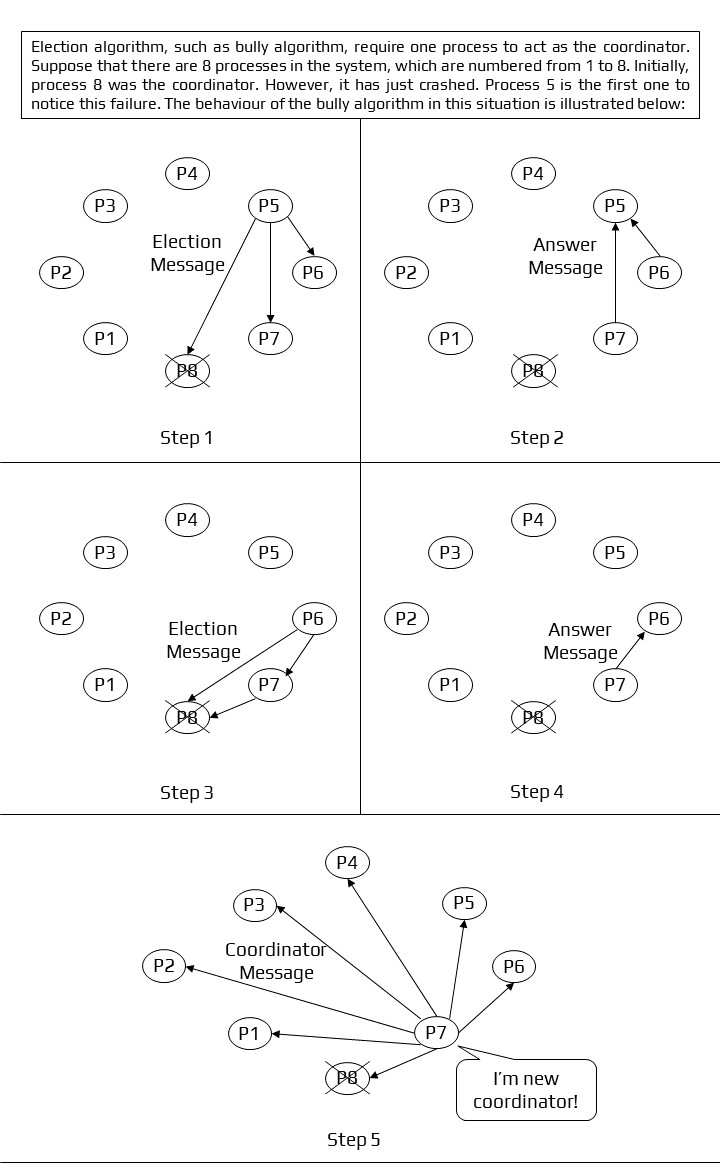
Working of Bully Algorithm
Python Implementation
# ---------------------------------------------------------

# Bully Algorithm Simulation

# ---------------------------------------------------------

# Assumptions:

# 1. Each process has a unique process ID (PID).

# 2. All processes know the PIDs of every other process.

# 3. The process with the highest PID becomes the coordinator.

# ---------------------------------------------------------

import random

class Process:
    def __init__(self, pid, alive=True):
        self.pid = pid
        self.alive = alive

    def __repr__(self):

class BullyAlgorithm:
    def __init__(self, processes):

# Processes sorted by PID (low → high)
        self.processes = sorted(processes, key=lambda p: p.pid)
        self.coordinator = max(self.processes, key=lambda p: p.pid)

    def is_alive(self, pid):
        process = next(p for p in self.processes if p.pid == pid)
        return process.alive

    def send_election(self, pid):
        """
        A process with PID 'pid' starts an election.
        It sends election messages to all processes with higher PIDs.
        """
        print(f"\nProcess {pid} starts an ELECTION.")

        higher_processes = [p for p in self.processes if p.pid > pid and p.alive]

        if not higher_processes:

# No higher process is alive. This process becomes coordinator.
            self.coordinator = next(p for p in self.processes if p.pid == pid)
            print(f"Process {pid}: No higher processes responded → becomes COORDINATOR.")
            self.announce_coordinator(pid)
            return

# If a higher process is alive, it sends back "OK"
        for hp in higher_processes:
            print(f"Process {hp.pid} responds: OK (I am alive).")

# The highest among them will take over and run its own election
        highest_alive = max(higher_processes, key=lambda p: p.pid)
        print(f"Process {highest_alive.pid} takes over the election.")
        self.send_election(highest_alive.pid)

    def announce_coordinator(self, pid):
        """
        Coordinator broadcasts its victory.
        """
        print(f"\nProcess {pid} announces: I AM THE NEW COORDINATOR.")
        for p in self.processes:
            if p.pid != pid and p.alive:

# ---------------------------------------------------------

# Example Usage

# ---------------------------------------------------------

# Create processes with IDs 1–5.

# Let's say the highest process (PID 5) has failed.

# ---------------------------------------------------------

processes = [
    Process(1), Process(2), Process(3),
    Process(4), Process(5, alive=False)   # Coordinator crashed
]

bully = BullyAlgorithm(processes)

print("Initial Processes:")
for p in processes:
    print(p)

# Process 2 notices coordinator is down and starts an election
bully.send_election(2)
Output Explanation:
Process detects coordinator failure
- Process P sees the coordinator (highest PID) is not responding, so it starts an election.
P sends election messages upward
- It contacts only processes with higher PIDs.
Higher process responds with “OK”
- If a higher-ID process is alive, it takes over.
Eventually, the highest alive process wins
- That process becomes the new coordinator.
Coordinator broadcasts its victory
- It sends a message to all processes announcing:
- “I am the new coordinator.”
Ring Algorithm
The ring algorithm [8] is another example of an election algorithm. This algorithm assumes that the processes are arranged in a logical ring and each process knows the order of the ring of processes. The processes are able to ‘skip’ faulty systems - systems that don’t respond in a fixed amount of time.
Algorithm:
- Here, when the process notices that the coordinator is dead, it builds and sends an election message to other processes.
- At every step, processes keep on adding their own id at the end of this.
- This stops when the initiator – a process that started the election – receives the message it sent.
- After this, the process with the higher id is declared to be a coordinator.
- The initiator then announces the coordinator by sending the message to the nodes.
- Here the maximum number of initiators is 2.
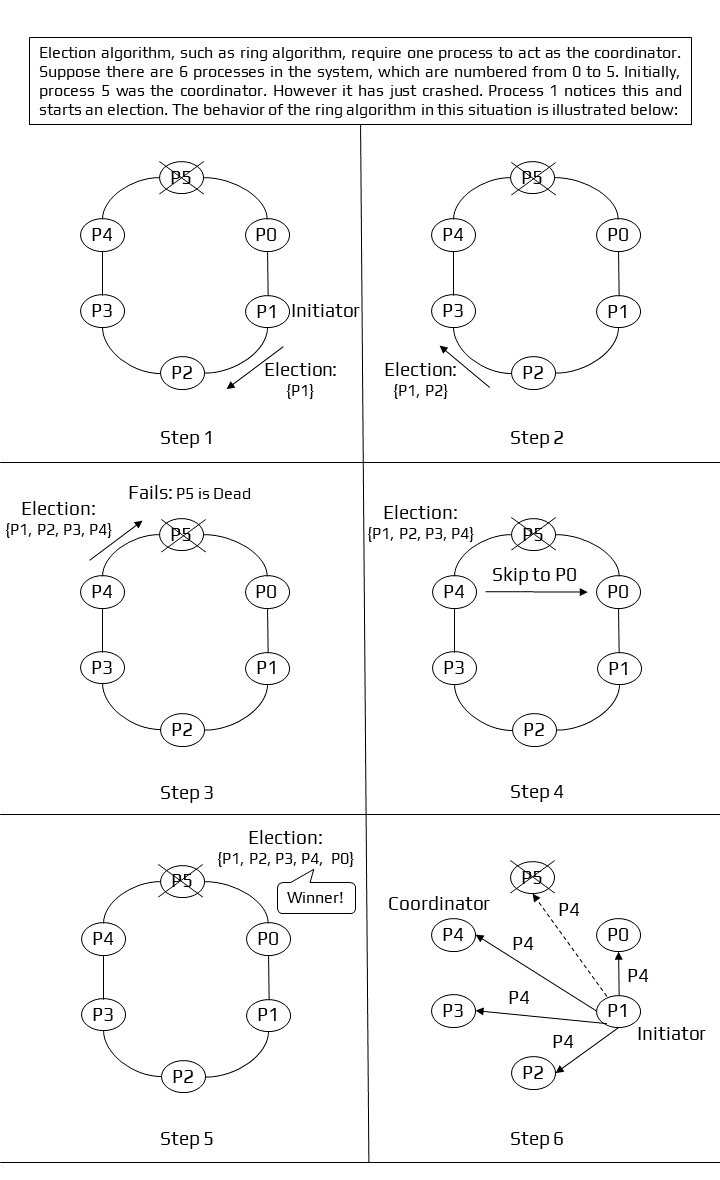
Working of Ring Algorithm
Python Implementation
# ---------------------------------------------------------

# Ring Election Algorithm Simulation

# ---------------------------------------------------------

# Assumptions:

# 1. All processes are arranged in a logical ring.

# 2. Each process knows only its next process in the ring.

# 3. Faulty processes can be skipped.

# 4. The process with the highest ID becomes the coordinator.

# ---------------------------------------------------------

class Process:
    def __init__(self, pid, alive=True):
        self.pid = pid
        self.alive = alive

    def __repr__(self):
        return f"Process({self.pid}, alive={self.alive})"

class RingAlgorithm:
    def __init__(self, processes):

# Logical ring (circular ordering)
        self.processes = processes
        self.n = len(processes)
        self.coordinator = max(processes, key=lambda p: p.pid)

    def next_process(self, index):
        """
        Returns the next alive process in the ring (skipping dead ones).
        """
        for i in range(1, self.n + 1):
            nxt = (index + i) % self.n
            if self.processes[nxt].alive:
                return nxt
        return None  # In case all are dead (not expected)

    def start_election(self, initiator_pid):
        """
        The election is started by the process with pid = initiator_pid.
        """
        print(f"\nProcess {initiator_pid} starts an ELECTION.")

# Find index of initiator
        idx = next(i for i, p in enumerate(self.processes) if p.pid == initiator_pid)

        election_message = [initiator_pid]  # message contains collected PIDs
        current = idx

# Send the election message around the ring
        while True:
            nxt = self.next_process(current)
            if nxt is None:
                break

            next_pid = self.processes[nxt].pid

# Message arrives at next process
            print(f"Process {self.processes[current].pid} → Process {next_pid}: {election_message}")

# If the initiator receives its own message back → stop
            if next_pid == initiator_pid:
                break

# Add this process ID to message
            election_message.append(next_pid)
            current = nxt

# Highest PID becomes coordinator
        winner = max(election_message)
        self.coordinator = winner

        print(f"\nElection complete. Collected IDs: {election_message}")
        print(f"Coordinator elected: PROCESS {winner}\n")

# Announce coordinator
        self.announce_coordinator(winner, idx)

    def announce_coordinator(self, coordinator_pid, initiator_index):
        """
        The initiator sends the coordinator announcement around the ring.
        """
        print("Announcing new coordinator across the ring...\n")

        current = initiator_index

        while True:
            nxt = self.next_process(current)
            next_pid = self.processes[nxt].pid

            print(f"Process {self.processes[current].pid} → Process {next_pid}: COORDINATOR = {coordinator_pid}")

            if next_pid == self.processes[initiator_index].pid:
                break

            current = nxt

# ---------------------------------------------------------

# Example Usage

# ---------------------------------------------------------

# Create processes in a logical ring order.

# Let's say PID 5 (coordinator) has failed.

# ---------------------------------------------------------

processes = [
    Process(1), Process(2), Process(3),
    Process(4), Process(5, alive=False)  # Coordinator crashed
]

ring = RingAlgorithm(processes)

print("Initial Processes (Ring Order):")
for p in processes:
    print(p)

# Process 2 starts the election
ring.start_election(2)
Output Explanation:
Logical Ring
- Processes are arranged in a ring and each process knows only the “next” one.
Initiator notices coordinator failure
- It begins the election by sending an election message containing its own ID.
Message circulates
- Each alive process:
- receives the message
- adds its own ID
- forwards to the next alive process
- Each alive process:
When message returns to initiator
- Initiator stops the process.
Highest process ID is selected
- That process becomes the coordinator.
Coordinator announcement
- The initiator sends the coordinator announcement around the ring.
Conclusion
Several synchronization algorithms in distributed systems have been studied in this paper. In terms of algorithms, we can conclude that for clock synchronization, both centralized and distributed algorithms must account for the propagation time of messages among each node. The sequencing of processes and the preservation of resource status requires clock synchronization. When it comes to the concept of time in distributed systems, the most essential element is to get the events in the right sequence. Events can be positioned either in chronological order with Physical Clocks or in a logical order with Lamport’s Logical Clocks and Vector Clocks along the execution timeline.
Presentation
Additional Resources
Research Paper & Implementations
Explore the full research paper, presentation slides, and Python implementations for the clock synchronization algorithms discussed above:
Citation
Please cite this work as:
Thakur, Amey. "Clock Synchronization: A Comparative Analysis of Berkeley and Cristian's Algorithms". AmeyArc (Mar 2022). https://amey-thakur.github.io/posts/2022-03-31-clock-syncronization/.Or use the BibTex citation:
@article{thakur2022clocksync,
  title   = "Clock Synchronization: A Comparative Analysis of Berkeley and Cristian's Algorithms",
  author  = "Thakur, Amey",
  journal = "amey-thakur.github.io",
  year    = "2022",
  month   = "Mar",
  url     = "https://amey-thakur.github.io/posts/2022-03-31-clock-syncronization-in-distributed-systems/"
}