Special thanks to Mega Satish and Hasan Rizvi for their meaningful contributions, support, and wisdom that helped shape this work.
Distributed File Systems form the backbone of large-scale data storage. Systems like the Hadoop File System, Google File System, and Network File System have changed how data is managed across servers. Each of these systems brings its own strengths and limitations when it comes to performance, fault tolerance, consistency, scalability, and availability.
This study compares these file systems and outlines a simple criterion for choosing the right one based on specific needs. It also highlights the key advantages and drawbacks of each system.
Introduction
A Distributed File System is a client–server model that lets clients access and process data stored across multiple servers as if it were on a local machine. It brings files from different servers together into a single global directory, creating a unified view of the system.
To ensure clients always receive the latest version of the data, the system includes mechanisms to prevent conflicts and manage updates effectively.
When designing such systems, several factors must be considered: transparency, flexibility, reliability, performance, scalability, and security. Key design aspects also include architecture, processes, communication, naming, synchronization, caching and replication, and fault-tolerance techniques.
Literature Survey
Table 1: Key Research in Distributed File Systems
| Year | Paper Title | Authors | Key Contribution |
|---|---|---|---|
| 2017 | "An Efficient Cache Management Scheme for Accessing Small Files in Distributed File Systems" | Kyuongsoo Bok, Hyunkyo Oh, Jongtae Lim, and Jaesoo Yoo | Introduced a distributed cache management scheme for the Hadoop Distributed File System (HDFS). The approach focuses on storing and caching small files efficiently to improve retrieval performance. |
| 2019 | "An Efficient Ring-Based Metadata Management Policy for Large-Scale Distributed File Systems" | Yuanning Gao, Xiaochun Yang, Jiaxi Liu, and Guihai Chen | Proposed AngleCut, a new hashing-based technique for partitioning metadata namespace trees. The method improves metadata handling in large-scale distributed storage systems by offering better balance and efficiency. |
The Library Analogy
How do you manage a library so big it doesn’t fit in one building?
The Analogy: The Inter-Library Loan
- Centralized (Your Laptop): All books are in one room. Easy to find, but if the room burns down, everything is gone.
- Distributed (DFS):
- Transparency: You search the catalog for “Harry Potter”. The system tells you it’s on Shelf 3. You don’t need to know that Shelf 3 is actually in a warehouse in another city. To you, it feels like the book is right next to you.
- Caching (AFS): When you borrow the book, you take it home (Local Cache). You read it there. Only when you return it (Close File) does the library update its records. This reduces traffic to the warehouse.
- Direct Access (NFS): You read the book at the library counter. Every page turn is a request to the librarian. It’s chattier but ensures you have the absolute latest version.
Network File System (NFS)
Network File System (NFS) is a mechanism for storing and accessing files over a network. It is a distributed file system that lets users access files and directories located on remote machines and use them as if they were on a local system. Users can create, remove, read, write, and modify file attributes on remote directories through standard operating system commands, making the interaction seamless.
Architecture of NFS
The diagram shows the client–server structure of the Network File System (NFS). It highlights how communication flows between the client machine and the server machine over the network.
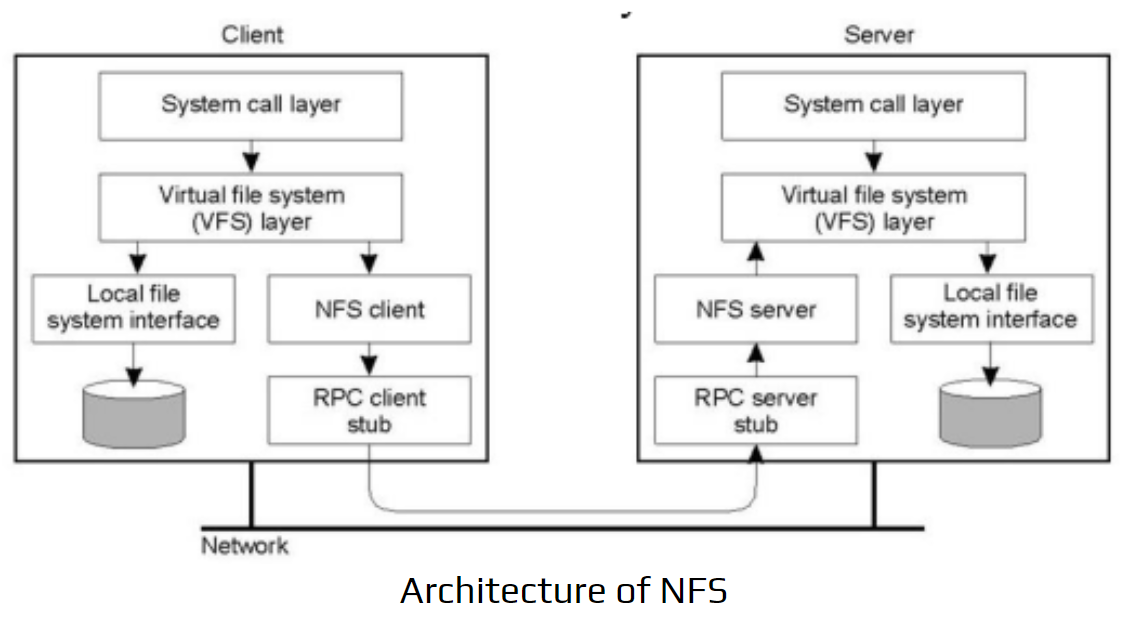
Architecture of NFS
Client Side
- System Call Layer: Receives file operation requests from applications (open, read, write).
- Virtual File System (VFS) Layer: Decides whether the request is for the local file system or a remote NFS-mounted directory.
- Local File System Interface: Handles local disk operations when needed.
- NFS Client: Converts VFS calls into NFS operations.
- RPC Client Stub: Sends these NFS requests to the remote server using Remote Procedure Calls.
Server Side
- System Call Layer: Handles incoming file-related system calls.
- VFS Layer: Routes operations to the correct file system.
- Local File System Interface: Interacts with the server’s local storage.
- NFS Server: Processes NFS requests coming from clients.
- RPC Server Stub: Receives RPC calls and forwards them to the NFS server component.
Overall Flow
The client makes a file request → NFS client converts it → RPC sends it → NFS server processes it → response returns via RPC. This makes remote files appear local to the user.
Features of NFS
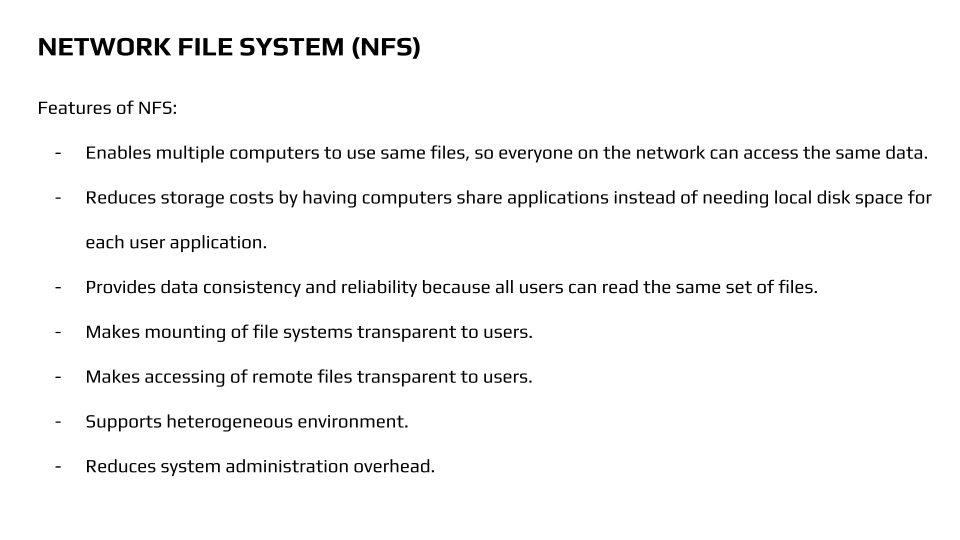
Features of NFS
- Lets multiple machines access the same files, so everyone on the network works with the same data.
- Cuts down storage costs by allowing systems to share applications instead of installing them locally on every device.
- Ensures consistency and reliability because all users read from a single, unified file set.
- Makes mounting file systems seamless, with no extra steps needed from the user.
- Keeps remote file access completely transparent, so using a remote file feels the same as using a local one.
- Works smoothly in a heterogeneous environment with different platforms and systems.
- Lowers system administration work by centralizing file management.
Andrew File System (AFS)
Andrew File System started as part of the larger Andrew project. It was originally called “Vice” and was developed at Carnegie Mellon University. AFS was mainly designed for systems running BSD, UNIX, or the Mach operating system.
Today, AFS development continues through the OpenAFS project. This version is cross-platform and works on Linux, macOS, Sun Solaris, and even Microsoft Windows NT.
Structure of AFS
The diagram shows how the Andrew File System (AFS) operates using a client–server model. It highlights how file requests move between the client machine and the server machine.
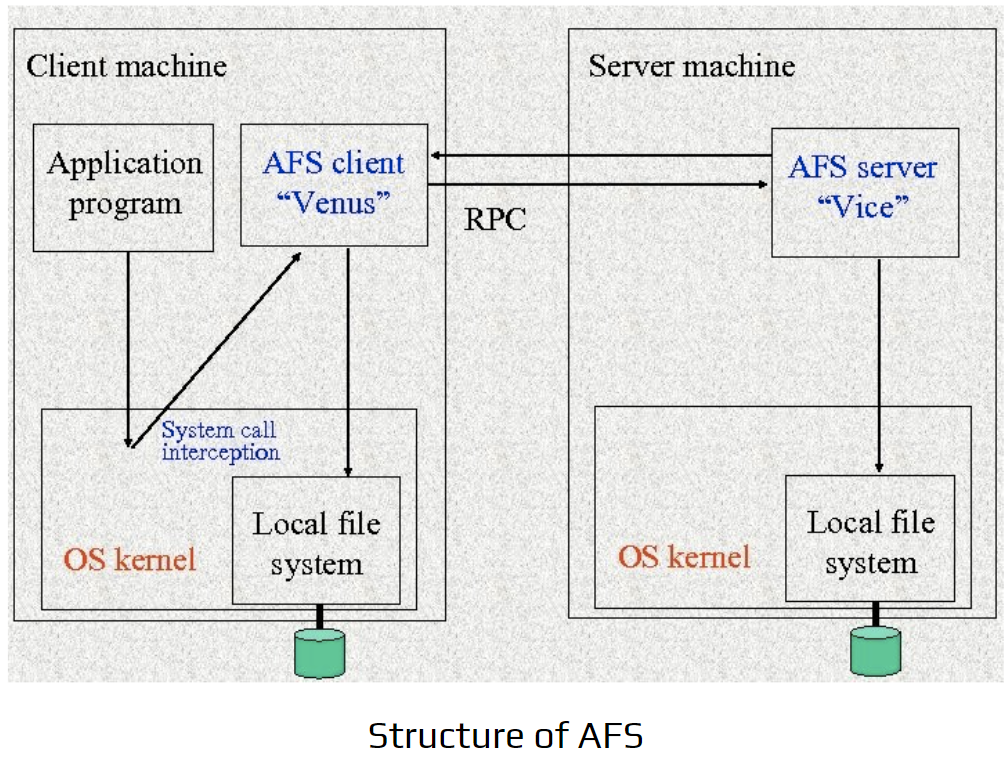
Structure of AFS - Venus/Vice Components
Client Machine
Application Program The user application makes normal file system calls (open, read, write).
System Call Interception Instead of sending these calls directly to the local file system, AFS intercepts them. This allows AFS to decide whether the requested file is local or remote.
AFS Client (“Venus”) Venus handles all AFS-related operations on the client side. It does two main things:
- Communicates with the AFS server using RPC.
- Manages local caching so frequently accessed files don’t require repeated remote requests.
Local File System Acts as the cache storage. Files fetched from the server are stored locally to improve performance.
Server Machine
AFS Server (“Vice”) Vice stores the actual file data and metadata. When a client requests a file not in its cache, Venus contacts Vice via RPC.
Local File System (on server) Stores the authoritative version of all files and directories managed by AFS.
Communication via RPC
- The client’s Venus component sends Remote Procedure Calls to the server’s Vice component.
- Vice returns the requested file or metadata.
- The client caches the received data in the local file system.
Overall Flow
- Application makes a file request.
- Venus intercepts the call.
- If file is cached → serve locally.
- If not cached → request from Vice via RPC.
- Vice sends file → client saves it in local cache.
- Application gets seamless access.
Vice and Venus Components
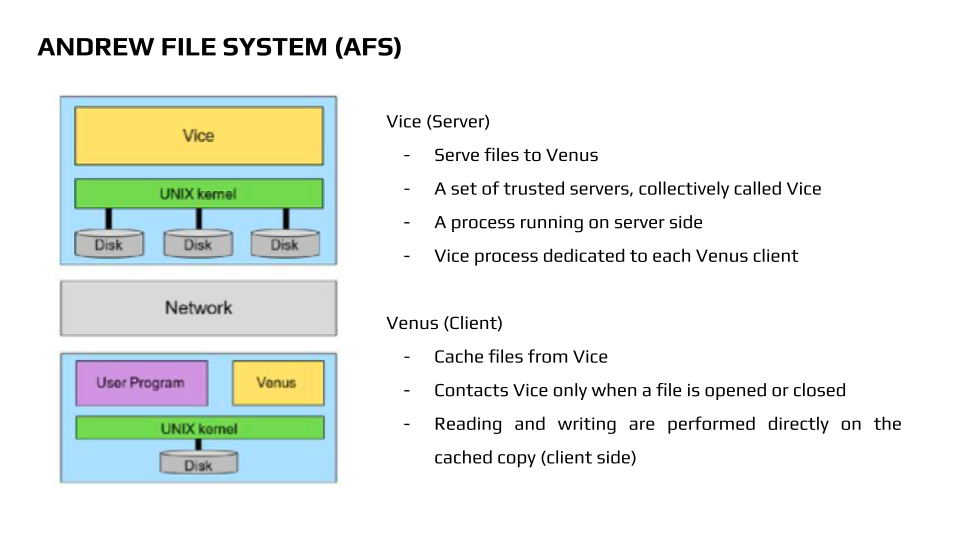
AFS - Vice & Venus Components
Vice (Server)
- Provides files to the client, called Venus.
- Consists of a set of trusted servers collectively called Vice.
- Runs a dedicated process on the server side.
- Each Venus client has a dedicated Vice process.
Venus (Client)
- Caches files from Vice locally.
- Contacts Vice only when a file is opened or closed.
- All reading and writing is done on the local cached copy.
Features of AFS
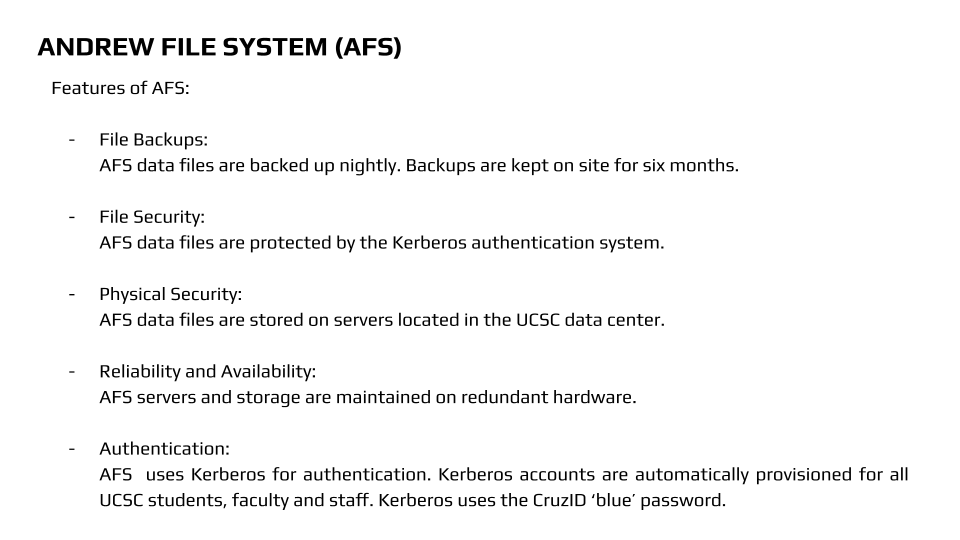
Features of AFS
- File Backups: AFS data files are backed up every night, with backups stored on-site for six months.
- File Security: Data is protected using the Kerberos authentication system.
- Physical Security: Files are stored on servers in the UCSC data center.
- Reliability and Availability: Servers and storage run on redundant hardware to ensure continuous access.
- Authentication: Kerberos handles authentication. Accounts are automatically created for all UCSC students, faculty, and staff, using the CruzID ‘blue’ password.
Google File System (GFS)
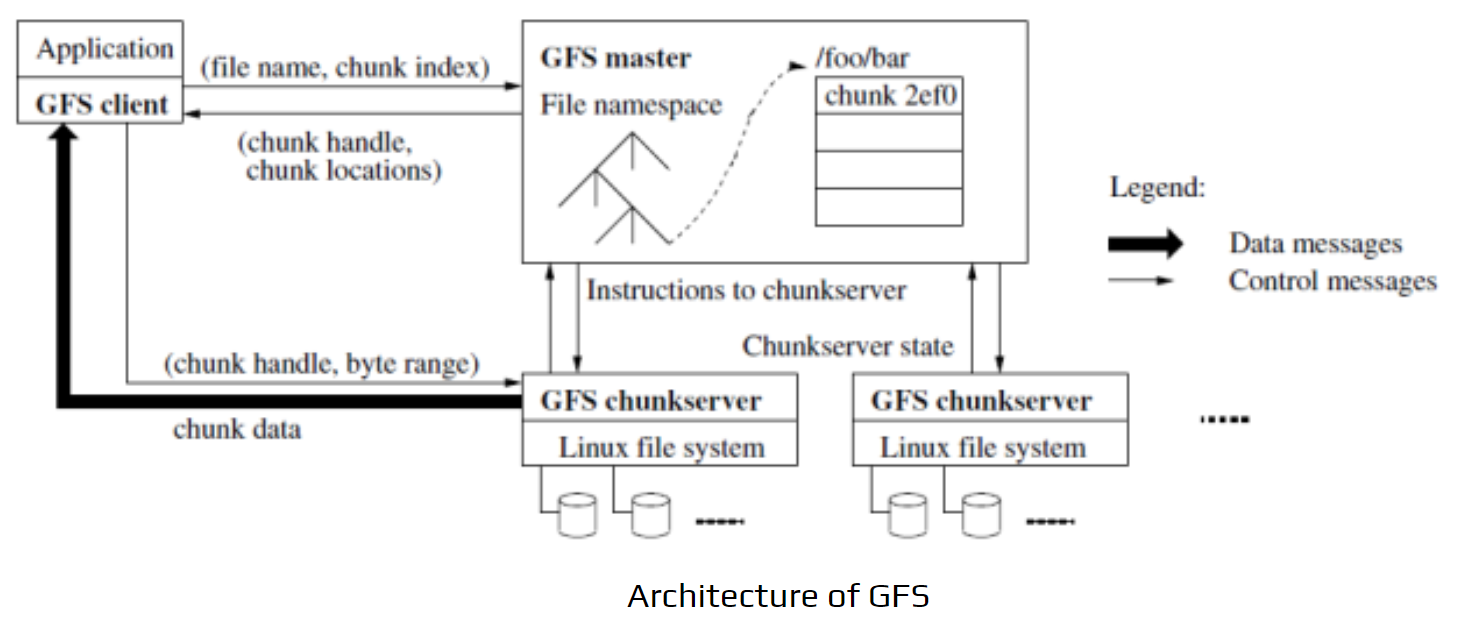
Architecture of GFS
Google File System is organized into groups containing many storage servers. These servers are built using cost-effective hardware and operate in a cluster-based setup. Files are stored in tree-like structures, and each file has a unique path name to identify it.
Architecture of GFS
This diagram shows how the Google File System (GFS) handles files using a master–chunkserver model.
1. Client/Application
- The application requests a file using a filename and chunk index.
- The GFS client communicates with the GFS master to locate the required chunk.
2. GFS Master
- Stores the entire file namespace (directory tree and metadata).
- Maintains chunk handles, chunk locations, and metadata about each file.
- Sends control instructions to chunkservers (e.g., replication, lease management).
- Tracks the state of each chunkserver.
3. GFS Chunkservers
- Store file data in fixed-size chunks on their local disks.
- Chunkservers send the actual chunk data directly to the client.
- They follow the master’s instructions for replication and updates.
4. Message Flow
Control Messages (thin arrows): Between client ↔ master and master ↔ chunkservers. These include metadata lookup, chunk locations, and instructions.
Data Messages (thick arrows): Client ↔ chunkservers. These carry the actual file data read or written.
Overall Flow
Client requests chunk info from master → master returns chunk metadata → client directly reads/writes data from chunkservers → chunkservers update master when needed.
Characteristics of GFS
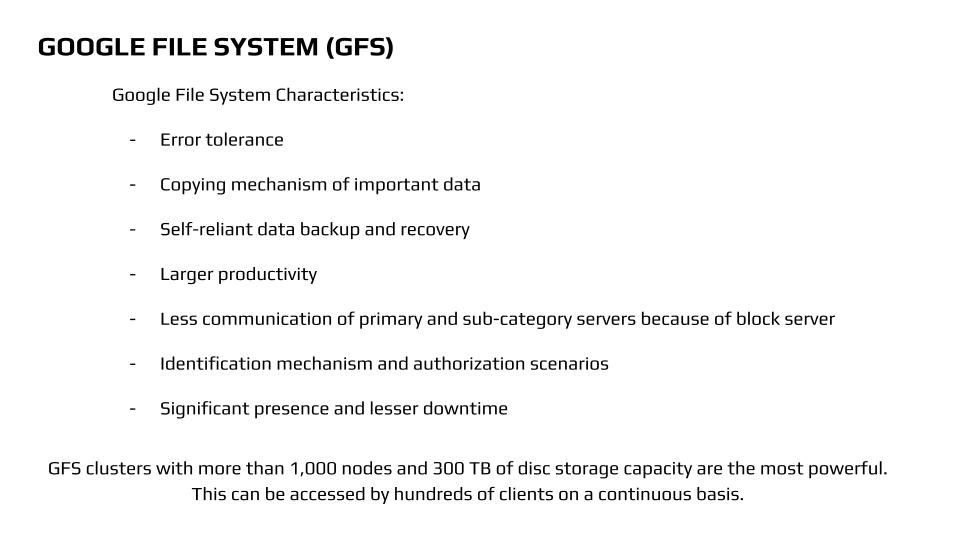
Google File System Characteristics
- Error Tolerance: GFS can handle faults without losing data.
- Data Replication: Important data is automatically copied across multiple servers.
- Backup and Recovery: Supports self-reliant data backup and recovery.
- High Productivity: Optimized for large-scale data processing.
- Efficient Communication: Minimizes communication between primary and secondary servers through block management.
- Identification and Authorization: Provides mechanisms to identify and authorize users.
- High Availability: Reliable system with minimal downtime.
GFS clusters with over 1,000 nodes and 300 TB of storage can serve hundreds of clients continuously, making them extremely powerful.
Hadoop Distributed File System (HDFS)
HDFS is an open-source version of the Google File System, designed to handle large datasets efficiently. It is widely used by web companies like Facebook, eBay, LinkedIn, and Twitter for big data storage and analytics.
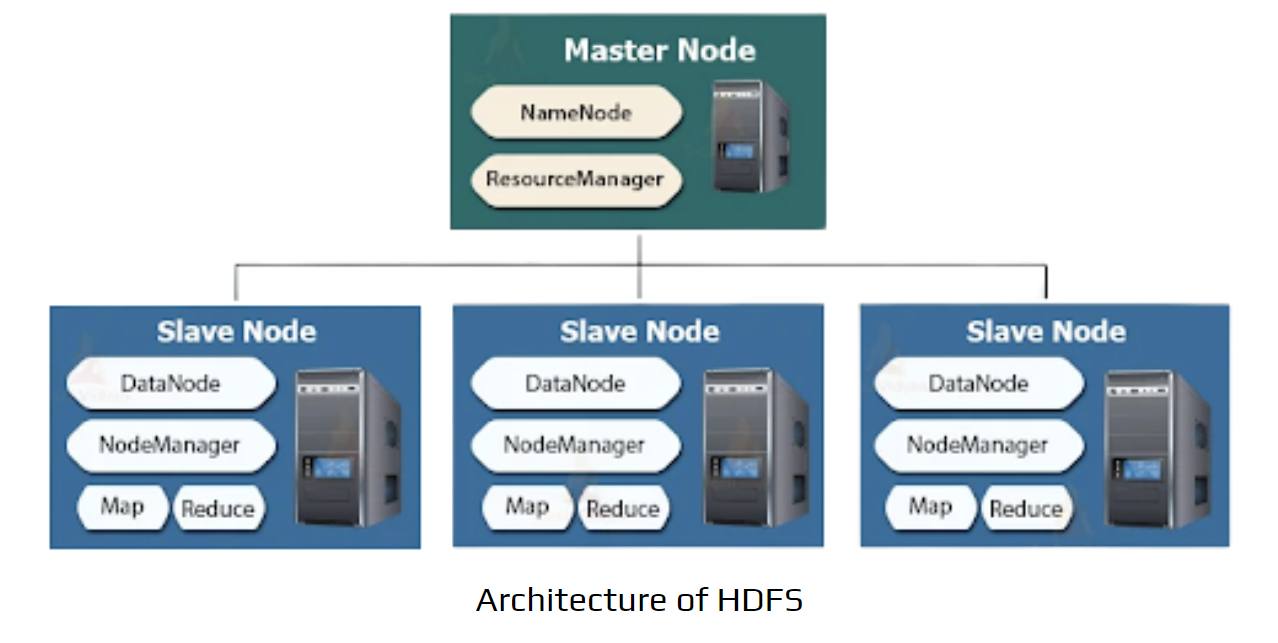
Hadoop Master-Slave Architecture (HDFS + YARN)
Hadoop Master-Slave Architecture (HDFS + YARN)
Hadoop 2.x clusters combine storage (HDFS) and resource management (YARN). The architecture has two main levels:
1. Master Node (The “Brain”)
Manages cluster health, metadata, and job scheduling. It does not store actual data.
NameNode (HDFS):
- Stores metadata like filenames, permissions, and locations of data blocks.
- Knows which Slave Node holds which part of a file but does not store file contents.
ResourceManager (YARN):
- Manages cluster resources (CPU, RAM).
- Accepts user job submissions and allocates resources to Slave Nodes.
2. Slave Nodes (The “Workers”)
Hundreds or thousands of standard servers performing storage and computation.
DataNode (HDFS):
- Stores actual data blocks.
- Sends heartbeats to NameNode and reports stored blocks.
NodeManager (YARN):
- Manages processes (containers) on the node.
- Executes instructions from ResourceManager.
Map / Reduce (Processing):
- Map processes chunks of data; Reduce aggregates results.
- Running computation on the same node where data is stored improves efficiency (Data Locality).
Workflow Summary
Storage: NameNode directs clients where to store data; DataNodes hold it.
Processing: ResourceManager assigns jobs; NodeManagers execute MapReduce tasks on Slave Nodes.
File System Comparison
Table 2: Comparative Analysis of Distributed File Systems
| File System | Performance | Scalability | Availability | Fault Tolerance | Data Flow | Reliability |
|---|---|---|---|---|---|---|
| NFS | Average one-way latencies: 0.027 ms, 6.87 ms, 13.9 ms | Scalable with pNFS (supports parallel storage) | Supports small and large files (100 MB to 5 GB) | Can tolerate CPU failure; state maintained in /var/lib/nfs | Transmission via TCP & UDP | Early versions were less reliable; improved in NFS v4 |
| HDFS | Average two-way latency: 175 s for files up to 50 GB | Nodes can be added or removed dynamically | High availability in Hadoop 2.x to prevent single points of failure | Creates replicas across different nodes/clusters | Uses MapReduce for data transfer | Data replicated across multiple machines for reliability |
| GFS | Fixed chunk size (64 KB); each block has 32-bit checksum | Minimizes master involvement to avoid hotspots | High availability using partitioned memory (BigTable) | Chunks stored in Linux systems and replicated across sites | Pipelining over TCP for high-bandwidth transfer | Controls multiple replicas across locations for reliability |
| OpenAFS | Cannot do parallel processing; average 1024 MB per unit time | Scales up to petabytes (1 GB per user; 1 PB for 1 million users) | 4-bit releases from secure endpoints; some stability issues | Replication doesn’t happen; uses multiple read-only servers | Supports read/write or read-only; can create 11 replicas of read-only data | Ensured via read-only replication and client-side caching |
What We Learnt From This Study
Table 3: Summary of Learnings: GFS vs NFS vs AFS
| Feature | GFS | NFS | AFS |
|---|---|---|---|
| Architecture | Cluster-based | Client-Server | Cluster-based |
| Caching | No caching | Client and server caching | Client caching |
| Similarity to Unix | Not similar | Similar | Similar |
| Data Storage / Reads | File data stored across different chunk servers; reads come from multiple servers | Reads come from the same server | Reads come from the same server |
| Server Replication | No replication | Server replication | Server replication |
| Namespace | Location-independent | Not location-independent | Location-independent |
| Locking | Lease-based locking | Lease-based locking | Lease-based locking |
Conclusion
This study compared several file systems, including NFS, AFS, GFS, and HDFS. Among these, HDFS stands out as the most preferred option due to its high performance, strong availability, and robust file replication, which provides excellent fault tolerance. GFS follows closely because of its scalability and use of data chunks that enable efficient pipelined transmission over TCP channels. NFS remains popular as a well-established system, trusted for its reliability, while OpenAFS offers several user-friendly features, including client-side caching and high scalability.
Presentation
Additional Resources
Project Source & Engineering Materials
Access the complete presentation and related computational engineering materials via the links below:
Citation
Please cite this work as:
Thakur, Amey. "A Comparative Study on Distributed File Systems". AmeyArc (Mar 2022). https://amey-thakur.github.io/posts/2022-03-31-a-comparative-study-on-distributed-file-systems/.Or use the BibTex citation:
@article{thakur2022dfs,
  title   = "A Comparative Study on Distributed File Systems",
  author  = "Thakur, Amey",
  journal = "amey-thakur.github.io",
  year    = "2022",
  month   = "Mar",
  url     = "https://amey-thakur.github.io/posts/2022-03-31-a-comparative-study-on-distributed-file-systems/"
}